
I originally thought it was the product's fault. After testing, I found it was the model's fault. Testing again, I realized something else — the word "model" actually hides three different things, and only one of them is the model.
Observation baseline date: July 26, 2026. All product versions, data, and source line numbers referenced in this post are as of that date.
Posts like this expire in about three months. Treat it as a snapshot, not a manual.
Prologue: a "major discovery" that almost embarrassed me
Here's how it happened.
I use a Coding Agent every day, anywhere from seven or eight hours to over ten.
When K3 launched, I wanted to see how far this model could go. If I was going to test it, I'd test its strongest form — which usually means the client made by the model's own team, so I installed Kimi Code. After using it for a while, a nagging feeling crept in: I never know what it's doing. A moon emoji spins on the screen for half a minute, then suddenly dumps a pile of results. With Claude Code, it would first say "let me look at this file" before doing anything — I could shout stop before it went off the rails.
I thought I'd found a real problem. So I went and read Kimi Code's source code (it's fully open source), spent most of a day, and found what I thought was "hard proof": its runtime did generate a human-readable line for every single tool call (something like Reading src/foo.ts), that line did get sent to the UI layer, and the UI layer did even store it — and then never displayed it.
I had even written up the issue, titled "tool.call.started carries a human-readable description, but the activity spinner ignores it."
Then I did one thing: opened Kimi Code and actually ran it.
Right there on screen, plain as day: ● Using Read (src/foo.ts).
The question I was about to raise had already been answered on screen the whole time. I had gone through 992 event log entries, the code for two engines, and nearly two months of merge history for the repo — and never once actually looked at the interface.
This post starts from that moment. I ended up taking apart seven mainstream Coding Agents one by one — reading the source for the five open-source ones, and reading the official docs plus hands-on testing for the two closed-source ones — together with my own logs of over 20,000 tool calls, and arrived at a conclusion completely different from my initial gut feeling. Along the way I was wrong twice: once the data proved me wrong, once I caught myself being wrong.
I'm going to include those mistakes too. Because in this field, how I discovered I was wrong is worth more than what I discovered.
Part one: the basics
If you already understand tool use and the agent loop, skip straight to 1.4 — that's where the main thread starts.
1.1 A counterintuitive fact first: large models can't do anything at all
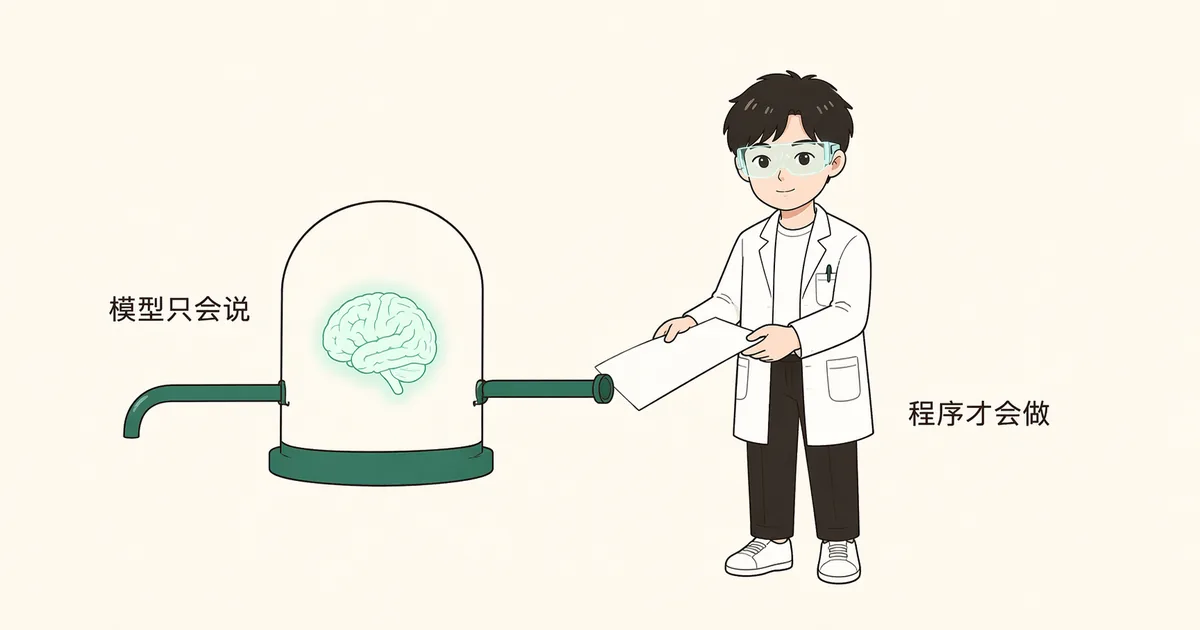
GPT, Claude, Kimi — at bottom, these large models only do one thing: you feed them a chunk of text, and they write the next chunk of text. They can't read your files, can't run your code, can't go online, can't change anything — a brain locked in a box, with only one pipe for text in and one pipe for text out.
So how does Claude Code manage to edit your code, run tests, and commit to git?
1.2 "Tool calling": giving the brain a pair of hands
The answer is a very plain trick called tool use. You don't need to modify the model at all — you just add a bit of text to what you give it:
You can use the tool Read (reads file contents), parameter: path.
To use it, reply in this format: {"tool": "Read", "path": "..."}
The model might then reply: {"tool": "Read", "path": "src/foo.ts"}.
Note: the model has not actually read the file — it has only "said" it wants to read it. The program outside actually reads the file: it sees this formatted text, goes and reads the file off disk, then feeds the contents back in as a new chunk of text. The model keeps writing from there — now it "knows" the file contents and can decide what to do next.
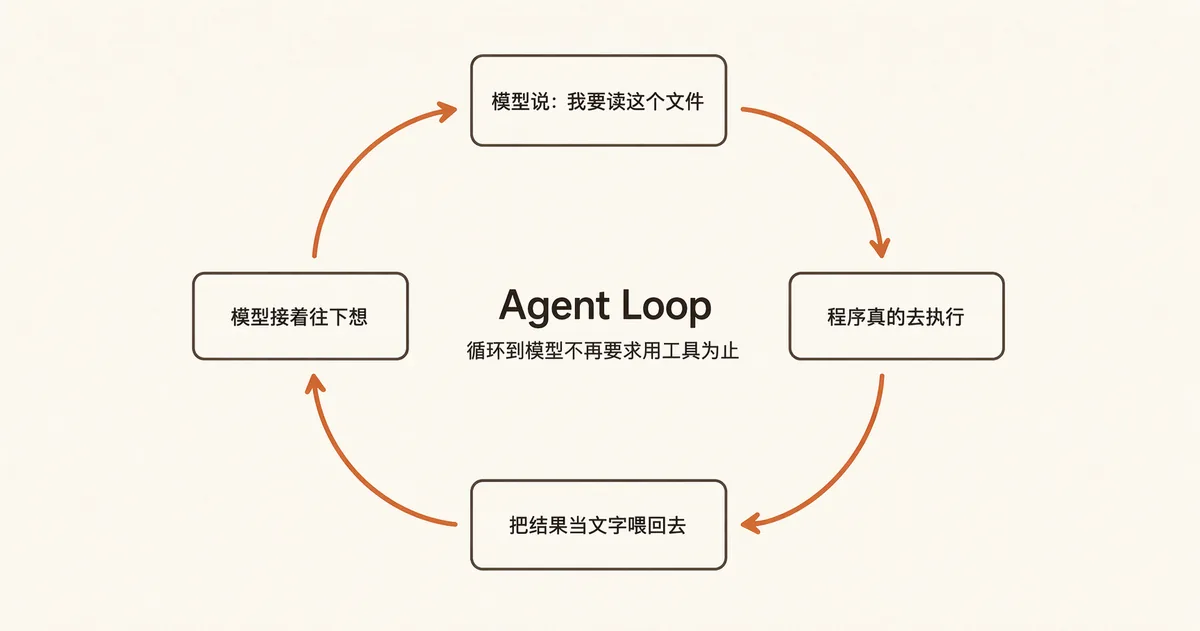
That's the entire trick. What's called an AI Agent is just this loop — the model says it wants to use a tool → the program executes it → the result gets fed back in → the model keeps going, until it stops asking to use tools and gives a direct answer. This loop has a name: the Agent Loop. Everything left in this post is just the shape this loop gets bent into by contact with the real world.
1.3 A minimal Agent only takes 50 lines
This isn't a figure of speech. The core code of a working Coding Agent really is about this small:
messages = [system_prompt, user_question]
while True:
    reply = call_model(messages, available_tools)
    messages.append(reply)
    if no_tool_call_in(reply):
        break                      # model is done, we're finished
    for each_tool_call in reply:
        result = actually_execute(each_tool_call)
        messages.append(result)    # feed the result back in, loop continues
This is the shared core of Claude Code, Codex, and Cursor — a while loop. If the core is only 50 lines, what are these companies' thousands of files and hundreds of thousands of lines of code actually for?
1.4 The main thread of this post: a while loop hits the real world, and five questions fall out
The answer: a huge pile of headaches that show up the moment this loop collides with the real world. Bundled together, they come down to five questions — they form the main thread of this post, and each of the five big parts below (which I'll call "the five cuts") tackles one:
| Question | In one line | |
|---|---|---|
| Q1 | Who decides what happens next | Who drives this while loop? Once it's running, can you still interject? |
| Q2 | How to precisely edit one line | The model can only spit out text — how do you get it to precisely change line 47 without rewriting the whole file? |
| Q3 | What happens when memory fills up | The model's "memory" has a hard limit — it fills up after a couple hours of chat, and then what? |
| Q4 | Do you greenlight dangerous operations | It wants to run rm -rf — do you block it? Blocking everything is annoying, allowing everything is risky. |
| Q5 | Can you actually see what it's doing | The loop runs for five minutes while you stare at the screen. How do you know it hasn't gone off track? |
Every difference between the seven products lives inside the answers to these five questions. And each question usually only has two or three families of solutions — the products are examples of solutions, not the categories themselves. So each cut below follows the same structure: what the problem looks like (a scenario you can put yourself in) → why it's hard → what the solution families are → the trade-offs of each → what it means for you.
A couple of spoilers up front, so you can read on with some suspense:
- For the first four questions, the seven companies give very different answers, but they've all basically solved it. The differences reveal values, not capability.
- Only one company has truly solved the fifth question. And the method it used wasn't a better prompt or a better UI — it wrote the solution into the protocol itself. This is where the whole post lands, and it's why I wrote this in the first place.
Conclusion of the basics section: an agent's core is a while loop you could write in 50 lines; 99.9% of a product's value lies in how it answers the five questions above. Evaluating a Coding Agent isn't about "can it call tools" — it's about "what choices has it made for you on these five questions."
Part two: the seven contestants' backgrounds
The teardown subjects, as observed on 2026-07-26:
| Made by | Open source? | Language | Form | |
|---|---|---|---|---|
| Claude Code | Anthropic | ❌ Closed | TypeScript | CLI |
| Codex | OpenAI | ✅ Open | Rust | CLI + IDE + Cloud |
| Cursor | Cursor | ❌ Closed | VS Code fork | Editor + CLI + Cloud |
| Kimi Code | Moonshot | ✅ Fully open | TypeScript | CLI + Web |
| OpenCode | Community | ✅ Open | TypeScript | CLI (client/server split) |
| Grok Build | xAI | ✅ Open | Rust | CLI |
| Pi | Two independent developers | ✅ Open | TypeScript | CLI |
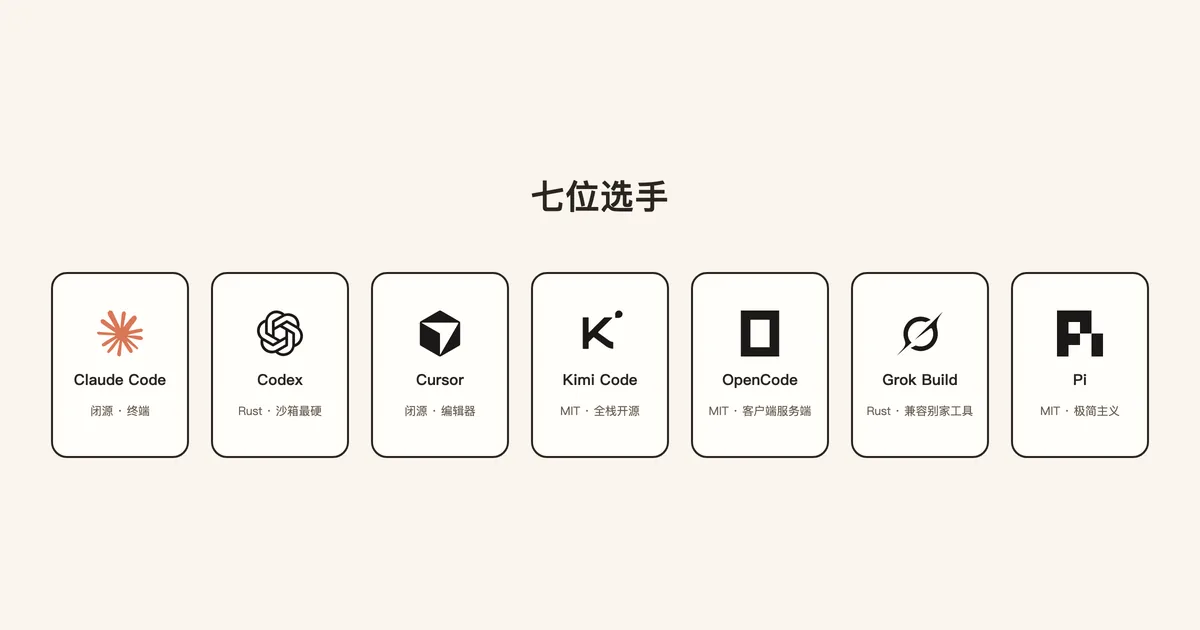
Two threads to keep in mind: the two Rust choices aren't about showing off (payoff in the fourth cut); Cursor is the only one on the editor route (detonates in the fifth cut).
Part three: cut one — who decides what happens next
Q1: Who drives this while loop? Once it's running, can you still interject?
3.1 A scenario first
You say "change the login endpoint's timeout to 30 seconds," hit enter. It reads a file, runs grep, changes two spots, and starts running tests. Right then you suddenly remember: the test environment's config also needs the change, but production must not be touched.
You have three possible moves: hit Esc to interrupt, type the correction straight into the input box, or wait for it to finish. These three moves behave completely differently across the seven products — some throw everything out and start over, some queue and wait until it's done, some slot your message in right before the next model call. The difference comes down to who owns the loop.
3.2 A distinction you need to make first: turn vs. step
- Turn: you say something, and everything that happens from there until the agent finishes and hands control back to you is one turn.
- Step: within a turn, each single "call to the model" counts as one step.
You say "help me fix this bug," and what actually happens is:
turn begins
  step 1: "read foo.ts"     → execute → result fed back
  step 2: "read bar.ts"     → execute → result fed back
  step 3: "change these three spots" → execute → result fed back
  step 4: "run the tests"   → execute → result fed back
  step 5: "fixed, here's why…" ← no more tool calls
turn ends
One turn ran 5 steps and called tools 4 times. The few minutes you spend waiting in front of the screen are just these steps scrolling by.
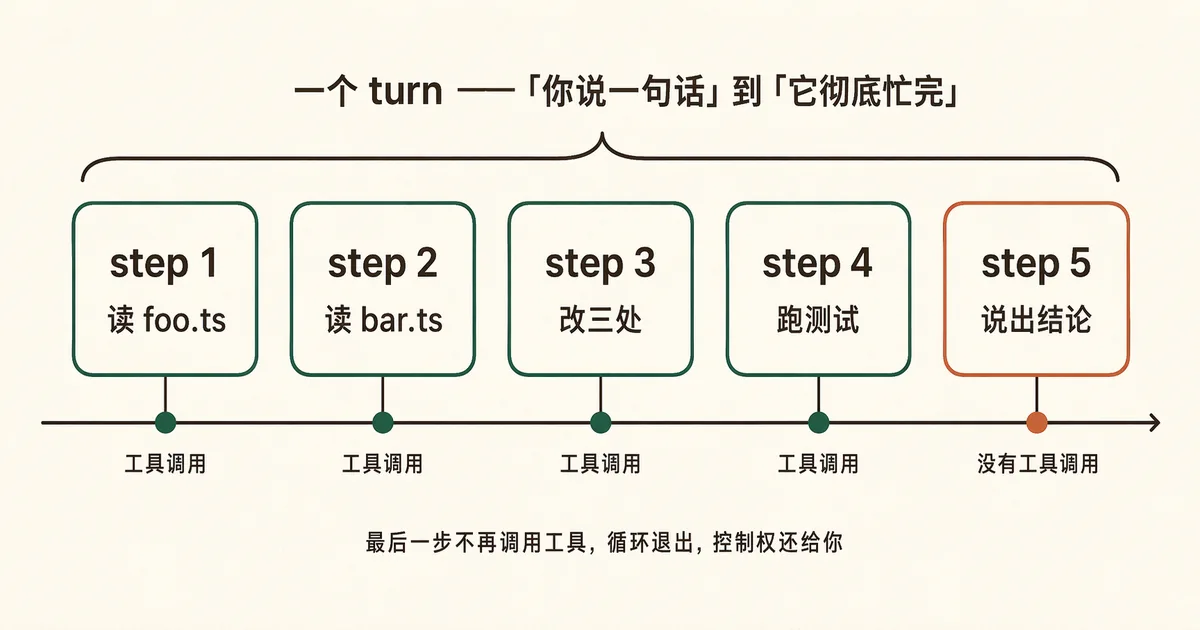
Keep this distinction in mind, because the only place you can interject is in the gap between steps — where a product puts that gap decides what your three possible moves from 3.1 will actually do.
3.3 Why it's hard
When you write that 50-line while loop, "what to do next" isn't even a decision: if the model called a tool, keep going — one if handles it. But the real world raises three follow-up questions: how do you decide whether to keep going (the model does declare a "stop reason," but it sometimes lies — it can declare itself finished while the same reply still carries a pending tool call); can multiple tools run at once (reading three files can run in parallel; writing to a file while reading the same file can't); and what does a user interjection even count as (an interrupt? a cut-in-line? a queued message?).
3.4 Solution family one: loop-driven (simple, good enough)
The loop watches the model's output itself and decides whether to go another round. Kimi Code's first-generation engine and Pi fall into this category; going by observable behavior, Claude Code does too.
Kimi's v1 engine is written like a textbook example: if the model's step called a tool, continue into the next round; if not, the turn ends. The whole logic lives in one place — anyone can understand it in twenty minutes.
Claude Code takes this style to its extreme (this section is based on an early piece of source code circulated in the community — treat it as folklore, not gospel): the whole loop is written as a single function, the turn is a first-class citizen, and there isn't even a step abstraction. The nicest part is how it decides whether to keep going: it doesn't trust the model's declared "stop reason" — it only checks whether a tool call actually showed up anywhere in this round's output stream, because the model sometimes lies, declaring itself done while a tool call is still hanging off the same reply.
Trust facts, not declarations. This is my favorite piece of design in this whole post — it admits "the model is an unreliable collaborator," and then moves the judgment call to a place the model's lying can't reach.
Pi pushes this style to its bare minimum: the README straight-up lists "no MCP, no sub-agents (sub-agent, plainly put: a clone the agent sends out to work in parallel), no plan mode, no permission popups" as selling points, and even stuffs its own documentation path into the system prompt (system prompt: the fixed instruction sheet a product hands the model before every conversation begins), letting the agent read its own docs to understand itself. This is a bet: that the model is smart enough that less framework is better.
Trade-off: the logic lives in one function, and anyone can read it in twenty minutes — but once you need to add cross-cutting abilities like "compress context," "insert a subtask," or "inject an interjection," they all have to get stuffed into that same function, and it gets more crowded every time.
3.5 Solution family two: queue-driven (complex, but scales)
The loop itself makes no decisions — its only job is to drain a queue; what happens next is decided by a separate module. Codex, Kimi Code's second-generation engine, and OpenCode's new engine fall into this category.
Codex is the heaviest of the three, and its answer to concurrency is elegant: it uses a read-write lock to express "which tools can run in parallel and which must run exclusively" — parallel-safe tools take a read lock, exclusive ones take a write lock. This is far cleaner than "maintain a whitelist and hand-write the queueing logic": the concurrency rule becomes a language primitive instead of a pile of if statements.
Kimi Code lets us watch this transition happen in real time: the CLI runs v1 (continue as soon as the model calls a tool), the web version runs v2 (a turn only finishes once the queue is empty, and the next step is decided by a separate service) — both shipping at once. You can watch a product's midpoint between "good enough to ship" and "built to be maintained long-term." OpenCode goes furthest toward true client/server separation — state lives in a database, the main loop re-reads it every round, so a crash can be picked back up, and multiple devices can take over the same session.
Trade-off: understanding the system costs much more, but in exchange, cross-cutting abilities can evolve independently instead of requiring changes to the main loop every time.
3.6 So where did that thing you interjected actually go
Back to the scenario in 3.1. Whether "queue / interject / interrupt" are kept distinct matters a lot: Kimi Code draws the clearest lines — hitting enter = queue (sent once the turn ends), Ctrl+S = interject (inserted into the current round), Esc = interrupt; Pi has the same two injection points, and when Esc interrupts, it returns the queued message to the input box; Claude Code's default behavior is "add a sentence" rather than "start over" (in my own session logs, queued injections happened 491 times, versus only 155 explicit interrupts); OpenCode doesn't yet have an explicit interject entry point — just a QUEUED badge.
Codex is the most careful of all: on interrupt, it first waits a gentle 100 milliseconds before force-killing, then appends an "interrupted" marker to history and synthesizes a "user aborted" result for every tool it killed. It looks fussy, but it fixes a real problem: history left holding "a tool call with no result" is a dangling record that the API will flatly reject on the next request.
What this means for you: if you're the type who likes to correct course mid-flight, products with a dedicated interject key will feel more natural. One general rule worth remembering: interrupting a running agent is always more expensive than letting it finish and correcting afterward.
Conclusion of this cut:
- Loops come in two flavors — self-driven (logic centralized, easy to read, hard to scale) and queue-driven (logic distributed, harder to read, scales better) — and two products are actively migrating from the former to the latter.
- The best judge of "whether to keep going" is fact, not declaration. And the only gap where you can interject exists at the step boundary — whether "queue / interject / interrupt" are three separate actions or one blended action directly decides whether your intervention feels like an addition or a restart.
Part four: cut two — how do you get AI to precisely edit one line
Q2: The model can only spit out text — how do you get it to precisely change line 47 without rewriting the whole file?
4.1 The scenario, and why it's hard
You have a 2000-line file and want to change one function's timeout from 10 seconds to 30. The model can only spit out text, so the crudest approach is to have it spit out the entire fixed file and overwrite the original. Try it and you'll see how bad it is: it's expensive and slow (changing one line means spitting out all 2000 lines), it loses things (the model easily "casually" deletes comments, blank lines, or even entire functions it doesn't understand, and you won't necessarily notice right away), and it's unreviewable (handed a brand-new 2000-line file, you can't tell what actually changed).
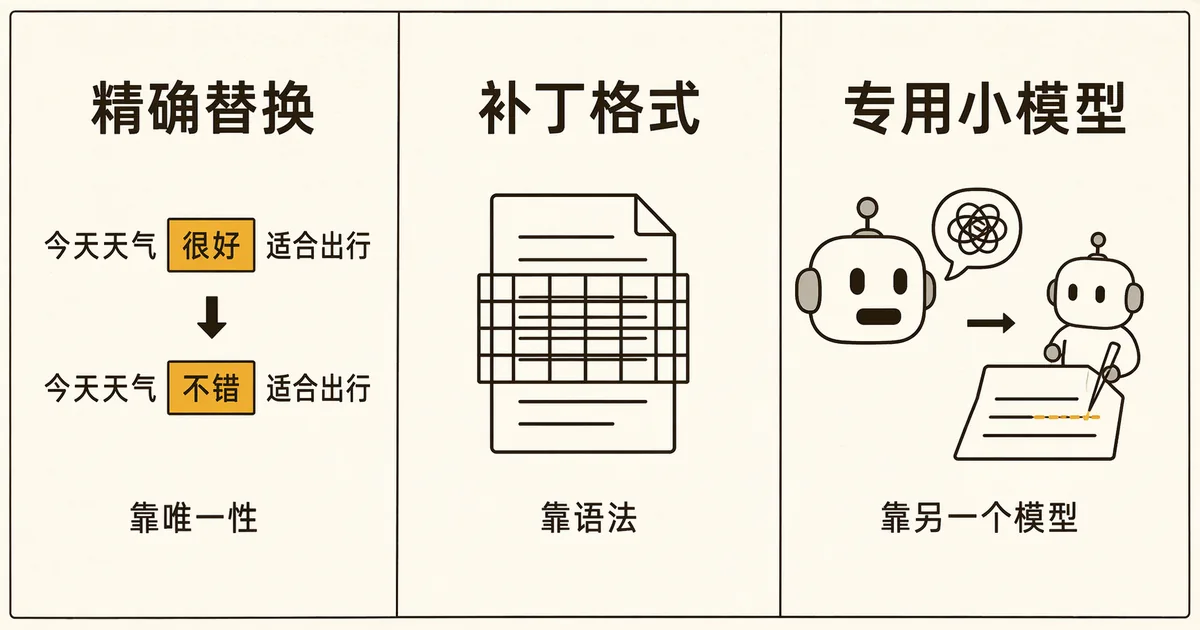
So every product does the same thing: have the model describe the "change" rather than the "result."
The catch is that this shifts the hard problem from the model onto the format — and the model's adherence to a format is probabilistic. Standard diff format is especially unfriendly: it requires exact line numbers, and the model frequently miscounts; get one character wrong and the patch fails to apply, which means a retry, which means resending the whole context again.
So three solution families emerge, differing in who you put the responsibility of "guaranteeing correct format" on.
4.2 Betting on "uniqueness" (Claude Code, Pi)
The model provides an "old text" and "new text" string pair, and the program finds the old text in the file and swaps it out. No line numbers, no counting. Claude Code adds a few locks (ones you'll actually run into while using it): the old text must appear exactly once in the file (two matches means an error, otherwise it might edit the wrong spot), the file must have been read before it can be edited (prevents the model from guessing at content it never saw), and error messages are structured so the model can self-correct from them. Its tool list doesn't even include a patch tool — this is the only path.
Trade-off: uniqueness is a real source of friction. When the line you want to change is return null; — and there are seventeen of them in the file — the model has to quote extra surrounding lines just to make the match unique, and the more it quotes, the more chances it has to get it wrong.
4.3 Betting on "grammar" (Codex)
Codex's signature move is apply_patch: it defines a diff-like format that's friendlier to models, then constrains the model's output with formal grammar (plainly put: at generation time, it dictates "the next character can only be one of these few options"), making it physically impossible for the model to output a malformed patch. The same parser guards two paths at once: the normal tool-call route runs through it, and even when the model sneaks a patch through the shell instead, it still gets routed through the same parser — closing the back door too.
Trade-off: this depends on the model provider supporting grammar constraints — not every provider offers it. Building reliability on top of infrastructure means you're tied to that infrastructure.
4.4 Leaning on "another model" (Cursor)
The large model's only job is to say "change this to that" (which can be sloppy, even something like // ... rest unchanged), and a separately trained small model pastes it precisely into the file — Cursor's early tech blog described this "fast apply" approach in detail (accelerated with speculative decoding: have the small model guess a chunk of output first, then batch-verify it, since most of the pasted code is copied verbatim and the hit rate is very high). Nobody outside can verify today's implementation details, but from observed product behavior, the "a dedicated model does the pasting" route hasn't changed.
The cost (inferred from observable behavior): it introduces a second probabilistic component. The first two routes fail with an error; this one can paste wrong without erroring — so Cursor has to pair it with a mandatory diff review interface (diff: a line-by-line comparison of two file versions, the red-delete-green-add kind). These two things are a package deal; you can't copy half of it.
What this means for you: if an agent keeps failing to edit a file, it's probably not "being dumb" — the uniqueness constraint has failed. The most effective fix isn't a stronger model, it's making the location more unique ("change the one inside the LoginService class").
Conclusion of this cut:
- Nobody makes the model rewrite the whole file. The disagreement is over who's responsible for "correctly formatted": uniqueness constraints (simple, but breaks on duplicate code), syntax constraints (most stable, tied to infrastructure), a dedicated small model (most flexible, but must be paired with mandatory review).
- This is also the cut that will be flattened fastest: Grok Build simply ported over the tool implementations of Codex and OpenCode, turning them into six switchable toolsets — the tool layer is going from "where products differentiate" to "where you shouldn't reinvent things."
Part five: Cut three — why AI "forgets"
Question three: The model's "memory" has a ceiling. Chat for two hours and it fills up — then what?
5.1 A scenario first
You've been chatting with an agent for two hours, refactoring a module together. Partway through, you explicitly said "don't touch the files in this directory." Then you ask it to add a small feature — and it touches that directory. You'll instinctively feel like it's "not listening," but the plainer truth is: that sentence is no longer in its memory.
5.2 What context is, and why it fills up
The model just "keeps writing what comes next" each time, which means every single call has to resend the entire prior conversation: on the 500th call, everything from the previous 499 calls (every file, every command's output) has to be sent again. This "everything" is the context, and it has a size limit. And Coding Agents are context gluttons: reading one file costs thousands of tokens, running one test costs tens of thousands, and after a few dozen rounds it's full.
The key point: the model has no "memory" — it only has "whatever's in this particular request." So-called forgetting isn't the model forgetting; it's that someone deleted that sentence before the model ever saw it. Who's "someone"? The mechanisms below.
5.3 Solution type one: compaction (everyone uses this)
Every product's first-line solution is called compaction: have the model summarize the prior conversation into a digest, discard the original text, and keep only the summary going forward. This is the "compacting conversation" message you occasionally see — afterward it's a bit forgetful, because the details really were thrown away.
I pulled stats from my own session logs on 105 compaction events: the effect was 407,000 tokens → 9,839 tokens, a 97.6% reduction; the cost was a median duration of 159.8 seconds, with the longest run hitting 394 seconds — the single longest pause in the entire workflow.
More interesting: of those 105 events, 103 were manually triggered by me, and only 2 were automatic. Today's models routinely offer context windows in the millions of tokens (a token is the unit models use to measure text; roughly one to two per Chinese character), and the automatic-compaction trigger threshold clearly hasn't scaled up proportionally with the window — in day-to-day use, you basically never hit it. In other words: in the era of million-token context, automatic compaction has effectively degraded into a manual tool.
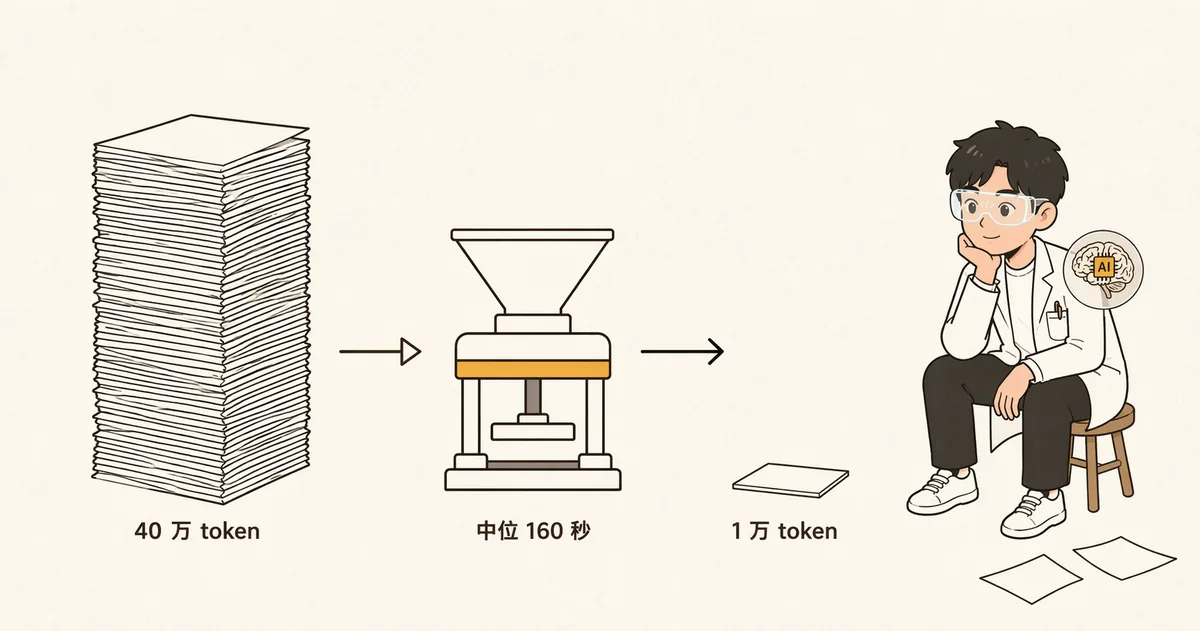
The cost of compaction is far worse than "slow": the summary is freely written by the model, and the next compaction is a summary of the summary — a copy of a copy, and it blurs within a few rounds. The "don't touch this directory" instruction lost in 5.1 usually dies during the second round of summarization.
5.4 Solution type two: making compaction controllable (OpenCode)
If free-form summarizing tends to blur, then don't let it be free-form. OpenCode's summary follows a fixed five-section template (goal / important details / work status / next steps / relevant files), and more importantly — the next compaction isn't a fresh summary, it's an "update to the previous summary" — maintaining a document, rather than photocopying a photocopy. It also has a lighter path called prune, which only wipes the output of old tool calls while keeping the record of the call itself — so you still know "I read foo.ts," you just don't remember the contents.
Claude Code's observable approach is "throw away as little as possible": oversized tool results don't enter the context at all — they're written to disk as files, with only a preview snippet and a pointer left in the conversation (you can see this kind of hint directly in the interface), and full compaction is kept as a last resort.
5.5 Two other paths: replay, and retrieval
Kimi Code's distinctive feature is a ledger — it records every operation as an immutable entry in a log (the technical term is event sourcing; in plain terms, bookkeeping: restoring a session isn't "reading a saved state," it's replaying the ledger from the beginning to recompute the state). But don't misunderstand: on the "won't fit" problem, it still relies on compaction — once context usage hits about 85%, it blocks and compacts, having the model write a first-person handoff note; my own ledger shows 8 such compaction events. The ledger manages a different axis: completeness of history, auditability, and never losing a record. I ran into the cost of this axis myself — more in part nine.
Cursor, meanwhile, steps outside the frame entirely: a lot of things shouldn't enter the context at all. It builds a semantic index in the cloud, chunks and encrypts code before uploading it as vectors, and syncs incrementally with a Merkle tree (in plain terms: like git, only transmitting what changed) — retrieving what's needed and not occupying space otherwise. The cost is clear: your code has to leave your machine.
5.6 There's also a kind of memory that spans sessions: AGENTS.md
All four types above manage "this session's memory." There's another kind meant to live longer: put a CLAUDE.md or AGENTS.md file (Codex, Kimi, OpenCode, and Pi all recognize the latter name) at the project root, writing things like "how to run tests for this project" or "don't touch this directory" — the agent reads it every time it starts up. It has already become the de facto standard. Codex goes a step further: it forcibly makes AGENTS.md, .git, and .codex read-only, for a hard-nosed reason — to prevent the agent from modifying its own rules of conduct to grant itself more privilege.
What this means for you: the right fix for the scenario in 5.1 isn't "say it again" — it's writing it into AGENTS.md. Any constraint you find yourself repeating a second time should move from the conversation into a file. This is the single most practical habit change I took away from this whole investigation.
Conclusion of this cut:
- AI's "forgetting" isn't mysterious — there's a concrete mechanism deleting things. Three categories of capacity solutions: compaction (everyone has it, slow and prone to blurring), structured + incremental updates (most stable), external retrieval (most efficient, but your code has to leave the machine); Kimi's event ledger solves a different axis entirely — restoration and auditability — and on the capacity problem it still has to compact, and the ledger's own history comes back to bite you later (part nine).
- Million-token context windows have effectively broken automatic compaction — it now works more like a button you have to press yourself; and important constraints shouldn't be said just once — conversation is volatile, files are persistent.
Part six: Cut four — do you let dangerous operations through or not
Question four: It's about to run
rm -rf. Do you block it? Ask about everything and it's exhausting; allow everything and it's dangerous.
If the first three cuts were engineering, this one is philosophy.
6.1 A scenario first
You ask an agent to clean up build artifacts. It generates a command:
rm -rf ./build ./dist $CACHE_DIRLooks fine. But what if it were written as rm -rf $CACHE_DIR/, and that variable happens to be empty on your machine? It would expand to rm -rf /. This is the whole difficulty of this cut: the danger isn't written in the literal text of the command — it's hiding in the execution environment, and you can't judge safety just by "reading the command once."
6.2 Why it's hard
Both directions are dead ends: pop up a confirmation for everything → you click "approve" fifty times in an hour, and by the fifty-first you're clicking with your eyes closed — approval fatigue turns the safety mechanism into theater; allow everything → the moment something goes wrong once, it might be irreversible.
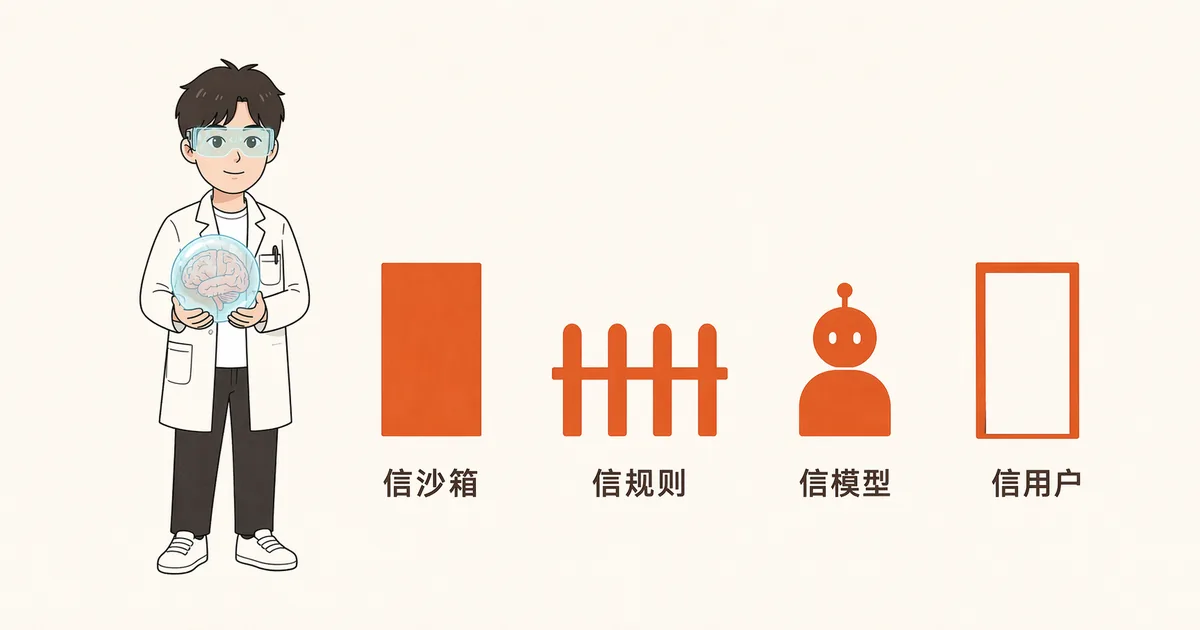
So the real question isn't "block it or not" — it's: which layer do you place your trust in? Laid side by side, the seven products' answers form a spectrum — sliding from "hand it to the operating system" all the way to "hand it to yourself," with the front end more rigid and the back end more flexible.
(A bit of foreshadowing: approving commands one by one has a side effect nobody writes into the docs — it forces you to actually see every single command. Cut five will come back and settle this account.)
6.3 Left end of the spectrum: hand it to the operating system (Codex, Claude Code)
The idea is: stop asking — just lock it down, so danger becomes structurally impossible.
Codex goes the furthest: a dedicated sandbox for each operating system (Seatbelt on macOS, bubblewrap + seccomp on Linux, a restricted token on Windows), defaulting to read-only, no network, fail-closed — that last term means "reject on failure" rather than "allow on failure," and the direction of this default is itself a stance. With this layer in place, a lot of approvals simply become unnecessary: even if the command in 6.1 really does expand to rm -rf /, all it can delete is whatever's inside the sandbox.
Claude Code takes a different path toward the same end: multiple permission tiers plus a sandbox mode, and in practice there's a clear payoff — once commands are allowed to run inside the sandbox, approval popups noticeably drop. Same direction as Codex: the harder the isolation, the less you need to ask a human — a direct cure for "approval fatigue."
The cost: sandboxes have to be implemented and maintained separately for each operating system, and normal work keeps getting blocked (e.g., installing dependencies over the network), so you keep having to punch holes — and every hole punched chips away at "structurally impossible."
6.4 Middle of the spectrum: hand it to rules and static analysis (Kimi Code, OpenCode)
Don't isolate the process — instead, examine the command clearly before executing it.
Kimi Code uses an ordered chain of nineteen rules, running top to bottom, and the first rule to reach a clear verdict wins. The more worth-copying detail is another one: the block on sensitive files (.env, SSH private keys, certificates) doesn't live in the permission layer — it's hardcoded into the tool layer — even at the most permissive setting, you still can't read your own private key, because that's not a permission question, it's a security boundary question. Permission is an adjustable knob; a security boundary is a place that shouldn't have a knob at all. Mix the two into one layer, and someday somebody will turn the knob all the way.
OpenCode, meanwhile, parses bash commands into a syntax tree and computes which directories it will actually touch, requiring permission only when it crosses a boundary — it's looking at structure, not literal text, but it still can't see through environment variables. No approach can truly see through the runtime — that's the unsolved part of this cut. It has two other creative primitives:
① Doom loop permission — the same tool called with the exact same arguments three times in a row triggers a popup. It models "the agent is spinning in place" as a dangerous operation requiring human approval — which happens to address the most expensive kind of failure: not an error, just infinite retrying.
② Rejection with a reason — when you reject something, it pops up a text box for you to write why, and that reason gets fed back to the agent as a special kind of error. Rejection stops being "failure" and becomes a course correction with a reason attached — in real life, what you say to a colleague isn't "no," it's "try a different approach."
The cost: static analysis is guessing "what will this command do," and its ceiling is set by the analyzer's precision — which will always lag behind human creativity.
6.5 Right end of the spectrum: hand it to the model, or to yourself (Cursor, Pi)
Cursor's automatic review is a three-tier funnel: whitelist → sandbox → have another LLM judge "is this command dangerous?" (it's not alone here — Grok Build's automatic mode takes the same path), and the official documentation openly admits this is just a "best-effort guardrail, not a hard security boundary" — the defining trait of this category is that it fails probabilistically, and silently. Pi, meanwhile, simply doesn't do permission popups at all, and writes it into the README as a selling point: you'll watch it yourself, you're responsible for yourself. This holds up completely when it's "one person, watching closely" — but it can't go into CI.
What this means for you: which tier to choose comes down to a single question — if something goes wrong, who cleans it up, and how fast will they notice? If you're watching it yourself as it runs, any tier works; but once it's unattended, or there's someone else's stuff in the repo, what you need isn't "smarter judgment" — it's "structurally impossible."
Conclusion of this cut:
- Every answer sits on the same spectrum: how close to the operating system do you place your trust? The closer, the more rigid (and the closer, the more resistant to silent failure — farther means more flexible, but also easier to fail silently).
- The real enemy isn't the dangerous command — it's approval fatigue. Two other things worth copying: permissions and security boundaries must be layered separately (turning the knob all the way still shouldn't reach your private key), and rejections should be able to carry a reason (a rejection is a course correction, not a failure).
Part seven: Cut five — can you actually see what it's doing (the core of this piece)
Question five: It's been looping for five minutes and you're just staring at the screen. How do you know it hasn't gone off the rails?
The first four questions — all seven products have, in some sense, solved them. This one, only one product has truly solved.
Now back to that question from the prologue.
7.1 Let's be clear about why this question is the hardest
The first four cuts all have clear success criteria: did the file get edited correctly, did the context overflow, was the dangerous command blocked. This one doesn't — its success criterion lives inside a person: can you catch it going off track at the thirtieth second, instead of the fifth minute. Even trickier: whether the model feels like saying something first is a matter of its personality, not your code — you can request it in the prompt, but a request isn't a guarantee.
So the right way to frame this cut is: when something important can only be handled by requesting the model's cooperation, do you have any other option?
7.2 Three measurements, wrong twice
What I wanted to quantify was exactly this: before an agent takes action, does it say something first to tell you what it's about to do.
I call this metric the "narration rate." Sounds simple. In practice I measured it three times, and got it wrong the first two.
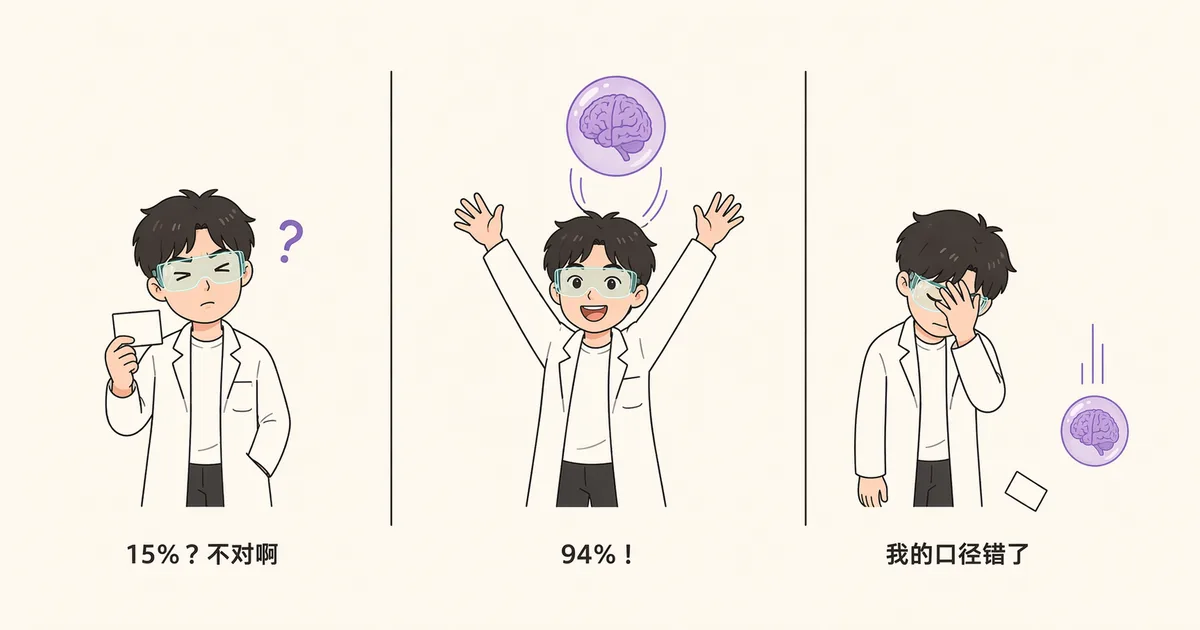
First attempt: I defined it as "whether there's text before the first tool call, within the same model response." The result: Claude Code came out to only 15%, about the same as Kimi's 21%. Conclusion: all three converge, no real difference.
When I showed myself this result, something felt off — I use it every day, and I could swear I see it narrate all the time.
Second attempt: I realized the problem — the text often gets sent as its own separate response before the tool call, with the tool call arriving in the next response. Slicing by response would wrongly discard narration the user plainly sees. So I switched to flattening everything by "the order it appears on screen." Result: Claude Code 94.1%, Kimi 31.6%. The conclusion flipped: a huge difference.
And the second attempt was also wrong.
My script had missed something: it wasn't counting "tool execution results" as part of the sequence. So multiple tool calls that were actually separated by results got incorrectly merged into "one batch," and if a turn said one sentence at the start, the whole turn got counted as narrated.
Same session file: the flawed algorithm gives 96.2%, the correct algorithm gives 36.7%.
Third attempt, I finally did the thing I should have done from the start: print out the actual real sequence and look at it with my own eyes.
thinking → Read → result → thinking → Read → result → thinking
text "Now editing sync_service.py, four places total:"  ← one sentence
Edit → result → Edit → result → Edit → result   ← three edits in a row, no explanation
thinking → Bash → result → Bash → result ……
The truth is: Claude Code doesn't narrate before every single action — it says one sentence before a stretch of work, then does three or four things in a row.
7.3 The final numbers
Using a unified metric (flattening the main chain into five element types — "text / thinking / tool / result / user" — and checking what immediately precedes each tool call one by one; "thinking" refers to the reasoning draft the model generates before its output, usually shown collapsed in the interface), across roughly 24,000 tool calls:
| Strict narration rate | "Any explanation" (incl. thinking) | Tools covered per sentence | Speaks before starting work (turn-level) | |
|---|---|---|---|---|
| Claude Code · opus-4.8 (previous gen) | 69.6% | 79.0% | 1.3 | 90.4% |
| Claude Code · opus-5 | 26.7% | 60.7% | 3.2 | 94.1% |
| Claude Code · fable-5 | 14.3% | 55.0% | 4.2 | 69.4% |
| Claude Code · sonnet-5 | 17.3% | 78.5% | 4.0 | 12.2% |
| Kimi Code · k3 | 17.7% | 55.2% | 3.9 | 88.7% |
| Kimi Code · deepseek-v4 | 15.9% | 27.1% | 4.9 | 66.7% |
| Codex | — | — | — | 99–100% |
Before you trust this table, read this
This table comes from one person, one machine, and a bit over three weeks of usage logs. It can support fewer conclusions than it looks like it can, so let me lay out the limits first:
- The sample is one person. My task mix was heavily concentrated in ops, data, and automation, so I can't fully separate "the model changed" from "what I happened to be doing that week changed." The truly independent unit isn't the 24,000 tool calls, it's roughly 60 sessions — so I don't interpret differences of a few percentage points at all, only differences of scale.
- The models weren't randomly assigned — time, task, and model are all tangled together. My only counter-confounding evidence: I split the data by client version, and for the same model the narration rate shifts by less than 1 percentage point, while between models it differs by several times over — version drift can't explain a gap that size.
- "Model" in this table is a compound variable: weights + the vendor's own system prompt + the request path. I have one glaring counterexample: the same opus-4.8 family has a 71% narration rate direct, versus 0.3% when resold through a third-party gateway. Same weights, two paths, two orders of magnitude apart. (This pair of numbers comes from a different measure — whether there's body text before the first tool call, judged straight from the API response. It's internally comparable, but not comparable to the v3-metric table above; also, the gateway side only had 379 requests — it's a counterexample, not a benchmark-grade measurement.)
- Model and product were never cross-tested — I never ran Claude's models through Kimi's shell. The experiment that could close this gap (running both model families through the same OpenCode client) I didn't do — this is the biggest debt I know I owe.
- The two sides were sampled differently (Claude Code: the 20 largest sessions; Kimi: everything), and the metric is blind to sub-agents — and sub-agent collapsing is exactly one of my conclusions, so the metric is blind to the very phenomenon it's supposed to explain.
With those caveats in hand, here are three conclusions.
Conclusion one: within the same model generation, Claude Code and Kimi Code show no real difference
Claude Code with fable-5 sits at 14.3%; Kimi Code with k3 sits at 17.7%. Counting the thinking stream, "any explanation at all" is 55.0% vs 55.2% — essentially identical.
My original gut feeling that "Kimi is worse than Claude Code" doesn't hold up once you control for model generation.
Conclusion two: switching models explains an order of magnitude more than switching clients
Look at the first row: the previous-gen opus-4.8 has a strict narration rate of 69.6%, averaging only 1.3 tool calls per sentence — basically "say one thing, do one thing." The current generation? The three main models (fable-5, sonnet-5, k3) drop to 14–18%, with opus-5 in the middle at 26.7%, and each sentence now covers three to five tool calls. This shift happened in sync across two different products.
But two things make this conclusion more subtle than "models collectively went quiet":
First, as noted above, "model" is a compound variable — the counterexample of 71% direct vs. 0.3% through a gateway shows that the vendor's own system prompt and request path can override the weights entirely on their own. So the accurate statement isn't "the model's personality changed," it's that "the model plus how it's served" changed as a whole.
Second, look at the "any explanation" column: sonnet-5's explanation rate is 78.5%, nearly identical to the previous generation's opus-4.8 at 79.0%. This generation of models may not have gone quiet — explanation more likely migrated from visible body text into the thinking stream, while the interface didn't migrate along with it. You're not unexplained, you just have to go dig it out of the collapsed section.
My sense that "something was wrong" formed while I was using the previous-gen model — I was comparing my memory of Claude Code against the Kimi of today. I attributed the effect to the wrong variable. This conclusion has a very practical corollary: any head-to-head review you read claiming "Product A explains itself better than Product B," if it doesn't hold the model (and how that model is served) constant, isn't actually measuring the product.
Conclusion three: only Codex wrote this into the protocol
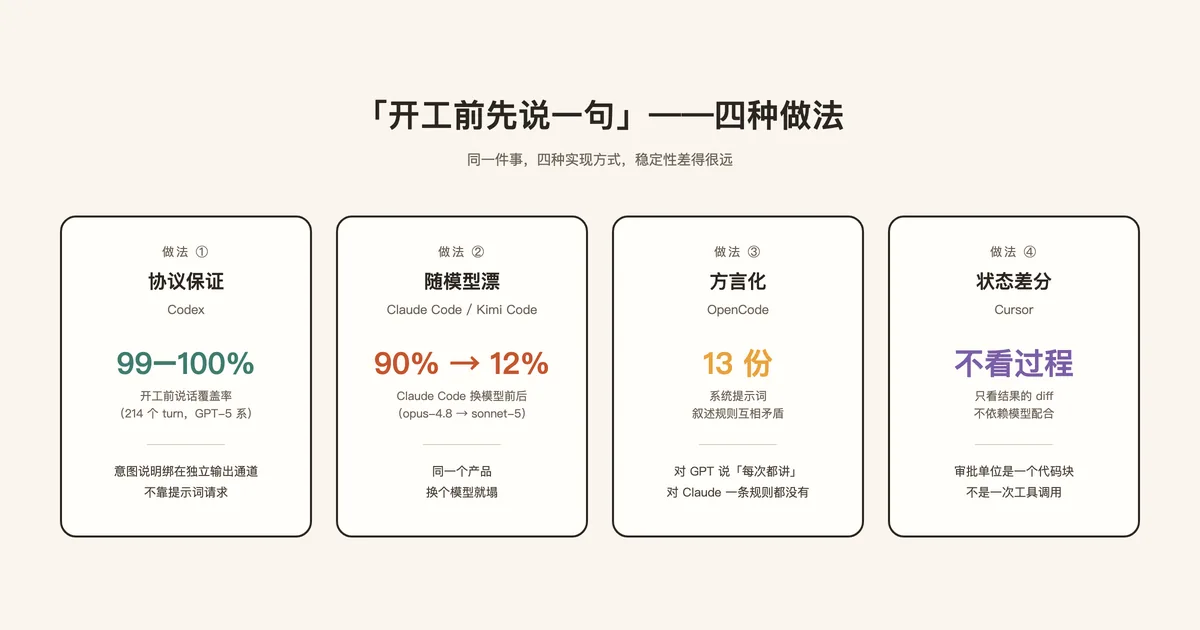
Look at the last row: Codex hits 99–100% on "says something before starting work."
What about Claude Code? 90.4% with opus-4.8, dropping to 12.2% with sonnet-5. Same product, different model, collapsed.
This is the answer to the question from 7.1: when something can only be delivered by asking the model to cooperate nicely, there is, in fact, another option — don't ask it. Change the protocol instead.
(Let me flag the boundary of this number first: the 214 Codex turns I measured all ran on GPT-5-series models, and this protocol was designed specifically for them — the protocol's actual enforcer is still the model. I have no data on how this mechanism would behave with a model that's inherently uncooperative. So the accurate statement is: of the seven, Codex is the only one that upgraded "process narration" from a prompt request to a protocol — and on its own models, that guarantee holds.)
7.4 Solution type one: write it into the protocol (Codex)
Let me first explain what "protocol" means here. In plain terms, it's a fixed data format agreed upon between model and client — which boxes the output is split into, and how each box is handled, spelled out in the interface spec rather than negotiated. GPT-5-series models have a specific feature: output is split into channels (analysis / commentary / final answer). Codex binds "the intent statement before a tool call" to the commentary channel, so it becomes a first-class citizen of the protocol instead of a request written into the system prompt.
Why does this matter? A request in a prompt can only be obeyed or ignored, but a channel has a type — once a piece of output is tagged as commentary, the whole system can treat it differently: commentary messages can be interrupted while the final answer can't; when spawning a sub-agent, only the final answer is inherited, so process narration doesn't pollute the sub-agent; the UI branches into two rendering paths based on "does this model support this channel" — when the model doesn't cooperate, the product still has a fallback.
The most telling detail: the word "preamble" appears zero times in Codex's current system prompt. The old version had an entire section on it; the new version doesn't mention it at all. Because it no longer needs to be requested through the prompt — it's already been baked into the architecture.
(One counter-note: the "thinking" section shown in the Codex UI isn't the model's actual chain of thought — the raw reasoning is transmitted encrypted, and in my logs only a minority of requests came with a plaintext summary attached, ranging anywhere from 0% to 31% depending on the model. Observability isn't "is something scrolling on screen," it's "can what's scrolling actually let you make a judgment call.")
7.5 Solution type two: write the narration style as a per-model-family dialect (OpenCode)
OpenCode gave an answer I hadn't anticipated: it has 13 different system prompts, routed by string-matching the model ID, and the narration rules across these prompts actually contradict each other — the one for GPT-4/o1/o3 requires "say something before every tool call"; the one for other GPT models requires "don't narrate routine reads"; the default one for Gemini and others requires "never preamble at all" — and the one for the Claude family contains zero narration rules whatsoever.
Same product, opposite instructions for different models. This approach admits something outright: the system prompt isn't "a statement from the product," it's "coaching aimed at a specific model," and it should be split up by model in the first place. The cost is maintaining thirteen separate files. (Codex goes even further, turning its system prompt into a server-side asset that can be hot-updated remotely — the very fact that a prompt can be hot-updated tells you how unstable it is.)
So now we have three shapes: protocol-guaranteed (Codex — baked into the architecture, stable), drifts with the model (Claude Code / Kimi Code — patched via the UI, breaks whenever the model changes), and dialectized (OpenCode — coached per model family, trading maintenance cost for stability).
7.6 Solution type three: don't look at process at all, only at diffs (Cursor)
The previous two approaches were both trying to figure out how to "let the user see the process." Cursor's answer is: don't look at the process, only look at the diff of the result.
What you see in the editor is a diff: which lines changed, accept or reject block by block, with checkpoints you can roll back to. The unit of approval isn't "one tool call," it's "one code block." This approach has an advantage the previous two don't: it doesn't depend on the model's cooperation — no matter how silent the model is, the diff is right there, not a single line missing.
But its useful range has a boundary, and the most interesting fact of 2026 is a two-way convergence: Cursor grew a command-line mode and a cloud agent, because it admits that when a task runs for ten minutes and touches twenty files, staring at diffs stops being economical; meanwhile the terminal camp has been adding diff previews to catch up. "Diff as observability" only wins in the range of synchronous, high-frequency, human-in-the-loop work; once autonomy is dialed up, both paths converge toward "plan first, AI reviews, PR sign-off."
7.7 Why this particular pain only bites a subset of people (and I'm one of them)
One piece of the puzzle is still missing here: if the narration behavior of two products is nearly identical within the same model generation, why did I feel this so strongly?
The answer lies in two of my own usage habits, which stacked together and happened to blow this problem up to its maximum size.
First, going back to the opening line: I installed Kimi Code chasing the K3 model, not the product. This is, in fact, how most people actually pick a client — you want to use a certain model, so you install whatever shell that vendor ships. So "switching product" and "switching model" felt, subjectively, like the exact same action — even though the two variables' explanatory power differs by an order of magnitude. My misattribution wasn't a fluke — it's the inevitable byproduct of this way of choosing tools.
Second, I run agents with full access, always. The very first line of my Kimi Code config is default_permission_mode = "auto" — the "default" I experienced was, from the start, full autonomy. I never approve things step by step.
The second point is actually the real crux, because it touches something rarely spelled out:
In step-by-step approval mode, the approval popup itself is a form of forced observability. Every command gets laid out in front of you before it runs — parameters, paths, which file it's about to touch. It's hard not to see it. You don't need the model to "be willing to explain," because the system pauses for you.
But the moment you turn on full access, you're the one who switched off that layer of visibility. What's left visible depends entirely on what the interface chooses to show, and what the model chooses to say.
So this is a clearly priced trade: you trade visibility for speed. The more autonomous you go, the more you depend on the product's willingness to narrate on its own.
And this current generation of models happened to drop that voluntary narration rate from 69.6% down to 14–18%.
It's the combination of both that blows the pain up: I turned off the forced-observability layer, and at the same time the model dropped the voluntary-observability layer to a historic low. Nothing was left to catch me in the middle. That's the full causal chain behind "I have no idea what it's doing" — it's not a flaw in any one product, it's a usage pattern colliding head-on with a model generation shift.
By the way, this also explains why my second misattribution went so wrong: I suspected "auto mode deliberately hides things, yolo mode shows them" — but my entire comparison happened between two fully autonomous modes. The one mode that's actually turned off (step-by-step approval), I'd never even entered.
7.8 So was my original hunch right or wrong?
Half right — and the wrong half turned out to be worth a lot.
| My judgment | Verdict |
|---|---|
| "You can't see what's running during execution" | ❌ False. The tool card renders while the model is still streaming out its parameters |
| "Auto mode deliberately hides it, only yolo shows it" | ❌ False. Frame-by-frame comparison shows both modes render identically |
| "Claude Code explains every step, Kimi doesn't" | ❌ Doesn't hold for the current versions (no difference within the same model generation) |
| The pain itself — "hard to intervene early" | ✅ True, but caused by model-generation drift + sub-agent collapsing |
On the last item: when Kimi Code spawns a sub-agent, the sub-agent's internal tool calls aren't shown separately — only the most recent 4 are rolled up on the parent card. OpenCode, by contrast, turns sub-agents into first-class sessions you can step into (navigable between parent/previous/next, each with its own usage stats visible).
This is the actual blind spot I was feeling — I just attributed it to the spinner the first time, and to permission mode the second time. Both wrong.
What this means for you: if you feel like "I can't tell what it's doing," don't switch clients first — check three things first: which model generation you're on (type /model in the client, or check the status bar for the current model name), which permission tier you have turned on, and whether your task involves sub-agents. All three of these have more explanatory power than which product you picked. And if you genuinely need "must be able to see everything" (say, editing code for someone else, or working in a production repo), then among the terminal-based tools, only Codex has written this into the protocol — and at least on its own models, that guarantee holds.
The takeaway from this cut:
- "Letting the user see" is the one problem architecture can't fully control from the model's mouth on down. Four approaches: protocol-guaranteed (the most stable within what I measured), drifts with the model (the most common), dialectized (the pragmatic one), and diff-only (the one that sidesteps the problem entirely).
- Across a measured 24,000 tool calls: the gap between products is far smaller than the gap caused by the compound variable of "model + system prompt + serving path." Any head-to-head review that doesn't hold these constant isn't actually measuring the product.
- The pain of observability is a function of autonomy level: in step-by-step approval mode, the popup forces you to see; in full-auto mode, all you have left is whatever the model voluntarily chooses to say — turning on full access isn't wrong, but you should know what you're trading away. And observability isn't the same as "something is scrolling on screen" — it's "can you make a judgment call by the thirtieth second when things start going sideways." By that standard, the industry as a whole still isn't passing.
Part eight: an invisible first constraint
The five cuts above share something unexplained: why is everyone so careful about "touching context"? Because there's one constraint that overrides every design decision, and it's rarely written into any documentation.
8.1 What is prompt caching
Every call has to resend the entire history, which gets expensive fast — hence caching: if this request's opening matches the previous one exactly, that part doesn't need to be recomputed, and the price is usually about a tenth of the original.
The key word is "exactly," and it's a prefix match — the moment even a single byte at the start differs, everything downstream of it in the cache goes invalid. History can only grow forward; edit the middle and the whole thing is wasted.
8.2 How strong is this constraint, really
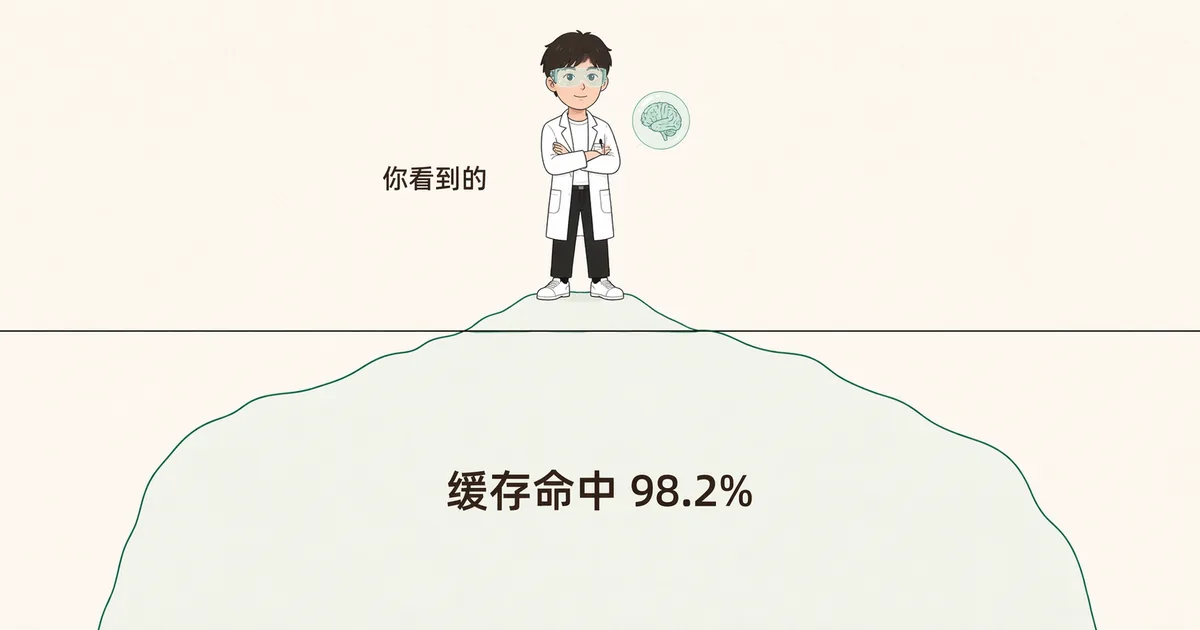
From my own session logs I counted: cache-hit tokens account for 98.2% of all input, averaging 270,000 input tokens per request. In other words: once the cache invalidates, cost jumps roughly tenfold.
That's what makes caching the hidden boss of the whole architecture. The most blunt piece of evidence sits right in open-source Codex: even though tools clearly finish running in parallel, the results have to be fed back into history in a fixed order—feeding them back out of order wouldn't break correctness, but it would make the prefix of two requests diverge, and the cache dies entirely. A design constraint that exists purely for caching, written straight into the code.
There's a detail in that Claude Code early source dump circulating in the community (again, treat it as unverified folklore) that I especially like: the line-number format for reading files was changed from ' 1→' to '1\t', and the reasoning is right there in the comment—the former adds 9 extra bytes per line, and multiplied across every file read across the whole world, it was estimated to account for over 2% of all uncached input on the entire network.
A choice that looks purely "aesthetic" turns out to be, underneath, a very real line item on a bill.
Looking back at the first five bucks I spent, a lot of choices suddenly make sense: why Claude Code would rather swap a large result out to disk for a pointer than reorder context—it's the same reason: the prefix must not change. This also explains why conversations of the same length are sometimes cheap and sometimes expensive: the expensive time is usually the one where you (or the compaction mechanism) touched the earlier part of history.
Part 9: A real bug, and the principle behind it
Kimi Code once had an experimental feature called "micro-compaction," which wrote a specific type of record into the event log. The feature was later removed and the code deleted—but on old users' logs, those records were still sitting there. So when you opened an old session with the new version and replayed it up to one of those records, the engine couldn't find that type in its list of "record types I recognize" and fell into the "unknown record, throw an error" branch. In one user's bug report, this error showed up at entry 1035 of the log, meaning a single restore could paint the screen red with a wall of errors. But "skip this record" was actually the correct behavior all along—the code had simply conflated "a planned skip" with "the log is corrupted."
I submitted a fix that was maybe a dozen-plus lines long (MoonshotAI/kimi-code#2211); after reproducing it on the release build and patching it, the same session restored cleanly.
This bug illustrates a general principle: removing a feature is harder than adding one, because data outlives code. Your historical data was written in the old vocabulary, but your new code only understands the new vocabulary—and that's the real bill for the "event replay" approach: to get a complete, auditable history, you have to remain backward-compatible forever with every word you've ever written.
Part 10: So which one should I use
No rankings here, just fit-for-scenario; the cost you'll pay is in parentheses.
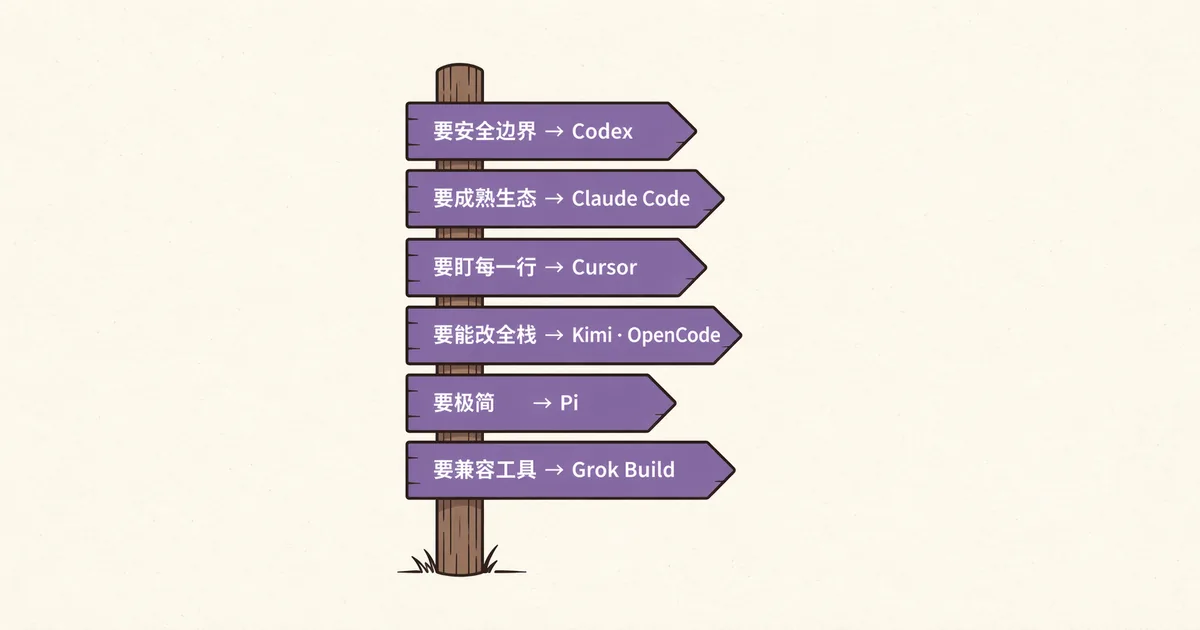
- Need a hard security boundary (classified work, unattended runs, CI) → Codex: three tiers of OS-level sandboxing, default no-network read-only. (Cost: the sandbox will block some legitimate work, and you'll have to learn how to open exceptions.)
- Need maturity and ecosystem, and your tasks run long → Claude Code: tiered context degradation, the richest tool ecosystem. (Cost: closed source—if something breaks, you can only observe it from the outside.)
- Need to see every single changed line, and you like being hands-on frequently → Cursor: block-by-block accept/reject diffs plus checkpoint rollback. (Cost: your code has to leave the local machine; the more autonomous the run, the less cost-effective it gets.)
- Need to modify, customize, and actually understand the full stack → Kimi Code (engine, server, protocol, and SDK all sit in the repo) or OpenCode (crash-and-resume, multi-client takeover). (Cost: both are mid-transition, and you'll bump into unfinished parts.)
- Believe in minimalism → Pi (cost: no permission prompts, so don't run it unattended); want a single binary that swallows the semantics of multiple tools → Grok Build.
One last honest line: the gap between these seven products is smaller than you'd think; the gap between model generations is bigger than you'd think. Before agonizing over which client to switch to, first make sure you know which generation of model you're actually running.
Epilogue: This article was wrong three times
I'm listing them out, because that's actually the most valuable part of this whole investigation.
First time: I thought I'd found an observability flaw in Kimi Code, wrote up the issue, and had it disproven by two minutes of actually running the thing. Lesson: inferring from source code instead of actually observing behavior is the easiest mistake to make, and the most embarrassing.
Second time: I used a "slice by API response" metric definition to calculate that "all three are no different," and my own gut sense as a heavy user tore it apart. Lesson: when a statistical conclusion collides with a heavy user's lived experience, doubt the metric definition first, not the experience.
Third time: I assumed the corrected metric definition was now right—except I'd overcorrected, missing the tool results and turning 36.7% into 96.2%. Lesson: a corrected metric still needs to be verified.
And even the third-time metric definition still has blind spots it can't see—those limitations in 7.3 are a debt I still owe.
Across all three, there was only one thing that ever actually settled the argument: print the real data and look at it with your own eyes.
Not more sophisticated statistics, not more source code—just "open it up and take a look."
I think this is also a metaphor for using AI. It'll show you an answer that looks complete—data, metrics, citations, airtight. The only thing you can actually do is go look at the real world, and ask: does this match what it told me?
Appendix: Data and methodology for this article
- Source-code baseline: Codex, Kimi Code, OpenCode, Grok Build, and Pi are public repos, observed on 2026-07-26; Claude Code and Cursor are closed-source, so conclusions come from official docs, publicly released artifacts, and locally observable behavior.
- Runtime data: my own real usage logs—20 largest Claude Code sessions, all 38 Kimi Code event logs, roughly 24,000 tool calls total went into the v3 metric; Codex sessions were counted separately (turn-level preamble coverage only, 214 turns).
- Narration-rate definition (v3): flatten the main chain into a sequence of five element types—visible text / thinking / tool call / tool result / user message—then check, for every tool call, the type of the element immediately preceding it, excluding sub-agent branches. In the table, Codex only has a turn-level column (its data hasn't been recomputed under v3), so it's only comparable to other products' turn-level columns.
- Reproducible: I plan to open-source the analysis scripts so anyone can run them against their own session logs to verify or overturn the numbers in this article. There's also a control experiment I haven't run yet: running the same OpenCode against the GPT family versus the Claude family should produce a significant difference in narration rate—that's the evidence needed to actually nail down "no difference between products."
- Trademark notice: product names and marks mentioned in this article belong to their respective owners and are used solely for reference and commentary; this is an independent analysis with no affiliation with or endorsement from any of the companies mentioned.
Comments
Loading…