
Archive note: This post was originally published on the WeChat Official Account "爱玩AI的医学生" (A Med Student Who Loves Playing with AI). It preserves how I thought and talked in the early days of using coding agents intensively; the usage figures, capability assessments, and tool judgments are personal notes from that particular moment in time. View the original post
A month ago I typed my first instruction to Claude Code into a terminal. As of today, I've burned through more than 1 billion tokens.
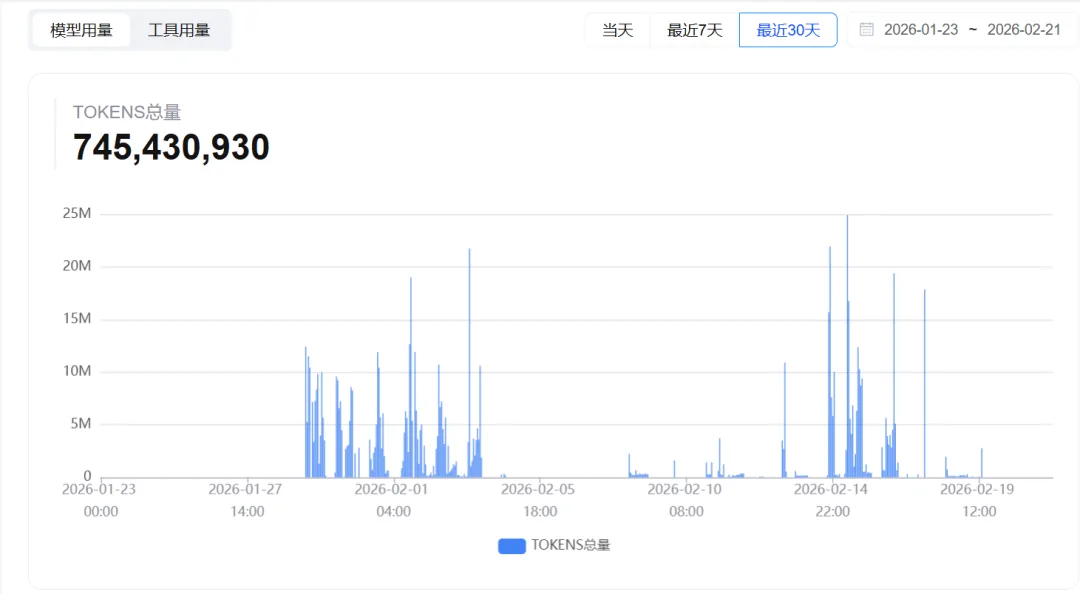
What does burning through 10亿 (1 billion) tokens even mean? Roughly the equivalent of feeding the entire Harry Potter series to an AI 600 times. And I'm a third-year clinical medicine undergrad with no CS background, code ability maybe ⭐⭐ out of five stars, who just dove headfirst into the world of AI coding.
Over this month I've been using Claude Code and OpenClaw intensively to write code, build systems, hit walls, and start over, going through the full emotional arc from "this thing is magic" to "this thing is a trap" to "okay, fine, it's my fault."
So this post isn't a tutorial — it's a retrospective. These are the lessons I paid for with 1 billion tokens, and I hope they save you some detours.
My core takeaways, five of them:
- Logic first, code second
- Small iterative steps, completed in stages
- CLI before UI
- AI hallucinates — check everything
- Patching is worse than starting over
First, let's get clear: what actually is Vibe Coding?
Before we get into methodology, we need to align on one concept — what Vibe Coding actually is.
The term comes from OpenAI co-founder Andrej Karpathy, and his original phrasing was roughly "fully give in to the vibes, embrace exponentials, and forget that the code even exists." In plain terms: you tell an AI what you want in natural language, and the AI writes the code for you.
Sounds simple, right? But in practice, you need two key abilities:
First, you need to know what you actually want.
Say you want an AI to help you build a web app. First you need to have thought through: what is this product for? What features does it need? What does the frontend look like? How is data stored? How do users interact with it?
If you haven't figured these things out yourself and you just go tell the AI "help me build an app," the AI can only hand you back something equally vague. Then you look at it, you're unsatisfied, and you say "this AI tool sucks, all the hype online is just influencers stirring things up."
It's not that the AI is bad. It's that you didn't know what you wanted.
(Here's a trick: if you genuinely don't know what your requirements are, just talk to the AI first. Let it ask you questions and guide you into articulating what you need. AI is actually a really good product manager.)
Second, you need to know how to talk to the AI.
AI is completely literal — it won't "guess" what you mean. If you say "this login feature isn't done, fix it up," the AI has no idea what you actually want — is the frontend styling wrong? Is the backend logic missing? Is the database not connected?
But if you say "the login API on the backend still isn't implemented, please add a user authentication API in server.py," the AI can nail the task precisely.
The more precise your description, the higher the quality of the AI's output. This isn't some profound truth, but a lot of people trip on exactly this.
1. Logic first, code second
This is the biggest trap I fell into.
I was working on an AI implementation project for a business, and needed to build a user database in a Feishu (Lark) multi-dimensional table. The data sources were messy — some scraped from Xiaohongshu (RED), some exported from WeChat Official Accounts, some entered manually — but the duplicate rate among users was extremely high.
My approach at the time: just tell the AI to start writing code, get the data imported first and figure out the rest later.
The result? The data did get imported — several thousand records. But when I went to deduplicate it, I found there was basically no way to do it. Different sources had different formats — some used phone numbers as a unique identifier, some used WeChat IDs, some had no unique identifier at all. I hadn't defined the core logic of "what counts as the same user" up front, so no matter how I wrote the dedup rules afterward, they were all wrong.
In the end I had to tear the whole table down and start over, wasting two days and a huge pile of tokens.
This taught me something: understanding the business matters more than implementing the code. You don't need to know how to code, but you absolutely need to be clear on what your business logic is. Where does the data come from? How does it flow? What are the core fields? What are the edge cases?
The AI can't answer these questions for you, because it doesn't understand your business. It can only write code based on the instructions you give it — and if your instructions are themselves built on flawed logic, no matter how elegantly the code is written, it's useless.
Google's engineering lead Addy Osmani said something to the effect of: before any code generation, work through a concrete, executable plan with the AI first. I completely agree. Taking the time to think it through first is much faster than just diving in.
2. Small iterative steps, completed in stages
I learned this one after repeatedly crashing and burning.
When I first started writing code with AI, I was greedy. I'd dump one giant requirement on the AI at once: "help me build a complete user management system, including registration, login, permission management, data export, logging..."
The AI would actually write it. But you'd find the code volume is huge, the logic is all tangled together, and one bug in one place ripples through everything. You want to change a small feature, and the AI might change three other features along the way, and things that used to work stop working.
Eventually I learned my lesson: break the big requirement into small tasks, and have the AI do one thing at a time.
For a user management system, for example, I'd break it down like this:
- Step 1: Get the registration API written and working first
- Step 2: Add the login feature, get it working
- Step 3: Add permission control, get it working
- Confirm each step is solid before moving to the next
The benefit of doing it this way: each step's change is small, so if something breaks, you can pinpoint immediately which step introduced it. Instead of facing a blob of hundreds of lines of changed code with no idea where the bug is hiding.
This is actually the same idea as "frequent small commits" in software engineering. That principle hasn't gone out of style in the AI era — if anything, it matters more, because the AI can generate way more code in one shot than you'd ever write by hand, and if you don't control it step by step, the project state can spiral out of control fast.
3. CLI before UI
This advice comes from OpenClaw's founder, and I think it's spot on.
A lot of people (myself included) starting a project with AI have their first instinct be: "let's get the interface built first!" After all, the interface is visible and tangible, and building it feels satisfying.
But the problem is: the interface is just the skin covering the function — the backend logic is the skeleton.
I was building a Xiaohongshu data collection tool once, and right off the bat I had the AI build a nice-looking frontend — a search box, a data display table, an export button. Looked the part.
But once I started wiring up the backend, I found the frontend's data structures didn't match the backend, the API formats didn't line up, and a lot of the interaction logic already built into the frontend had no corresponding implementation on the backend. In the end I basically had to rewrite the frontend from square one.
Claude Code founder Boris Cherny has a concept called "the terminal is home base," meaning: get the core functionality working in the command line first, confirm the logic holds up, and only then wrap it in a UI.
My current approach is:
- Write the CLI version first, use the command line to validate the core functionality
- Confirm the data flow and business logic all check out
- Build the frontend UI last — at that point it's purely a "display layer" and won't clash with the backend
Get the skeleton working before you put clothes on it. Don't reverse that order.
4. AI hallucinates — check everything
This is the one every single person coding with AI needs to have burned into their brain.
AI will make things up with total confidence.
It'll write you code that calls an API that doesn't exist, and write it with total confidence, comments and all. It'll reference a library version that was never released. It'll tell you "this code has been tested and passes," when it never actually ran it.
Django co-founder Simon Willison had a precise description of LLMs: "an over-confident pair programmer." I think that description nails it. AI isn't stupid — it's over-confident. It will never tell you "I'm not sure." It'll only ever give you an answer that looks correct.
I've been burned by this several times. Once the AI wrote me a piece of Python code that imported a library called feishu_sdk. The logic looked flawless, I ran it, and got: ModuleNotFoundError. I searched PyPI — that library doesn't exist. The AI had made the whole thing up.
So now my habits are:
- After the AI writes code, run it — don't just look at the logic and assume "this should be fine"
- For anything involving third-party libraries, confirm the library actually exists and check the version
- For key business logic, review it yourself — don't trust the AI's judgment blindly
- When the AI says "fixed," verify it — it often claims something's fixed when it isn't
AI educator Andrew Ng shared a real case: someone had an AI agent clean up a project's files, and the AI ran rm *.py, deleting every Python file in the whole project. Not a joke — it actually happened.
Trust the AI's ability, but verify its output. That's the iron rule.
5. Patching is worse than starting over
This one is the most counterintuitive, but might also be the most important.
When your code hits a bug, what's your first instinct? Have the AI fix it. Still buggy? Have it fix it again. Still not right after three rounds? Keep fixing.
I used to do exactly this. Once I had a data export feature that broke, and I had the AI fix it across about seven or eight rounds, and every round it said "fixed" — but every time, it fixed one bug and introduced a new one. The code got more complicated with each edit, the logic got messier and messier, and by the end I couldn't even understand what the code was doing anymore.
Eventually I made a decision: delete it, rewrite it.
I reorganized the requirements from the ground up, opened a new conversation window, and had the AI write it from zero. Done in 20 minutes, worked on the first run.
How long had I spent patching it before that? Three hours.
This taught me something: when you find that a feature has gone through many rounds of fixes and still isn't working, the problem is probably not in any one line of code — it's the overall architecture or approach that's flawed. Patching over and over on a flawed foundation just makes it worse.
This isn't only true for code. It's the same with third-party tools — if a tool won't run no matter how long you fiddle with the configuration, rather than keep struggling, it's often faster to uninstall and reinstall from a clean state. Reinstalling is often much faster than fixing.
Knowing when to cut your losses is a skill in itself.
How should you pick your tools?
That covers methodology — now let's talk tools.
Over this month I've used quite a few AI coding tools and hit plenty of snags. Here's my honest experience.
If you're a complete beginner, I'd recommend starting with Trae.
Trae is an AI coding tool from ByteDance, and its biggest advantage is: it's free, and needs zero configuration. Download, install, open, and use. For someone who's never touched AI coding before, that zero-barrier entry matters a lot. You don't need to set up API keys, configure environment variables, or use a VPN. Getting a feel for what AI coding is like first, and building your confidence, matters more than anything else.
Once you're comfortable and want more power, move up to Claude Code.
Claude Code is my main tool now. It runs in the terminal, no fancy UI, but its coding ability is genuinely strong. It can understand complex project structures, make cross-file edits, and handle fairly long context. The downside is it needs an API key, requires some configuration skill, and it really does burn through tokens fast (most of that 1 billion tokens came from this tool).
On model choice — domestic Chinese models are already quite competitive.
I mainly use Zhipu's GLM series. Honestly, I was biased against domestic models at first, assuming they'd never match Claude. But in actual use, GLM-5's code generation performance is already very close to Claude's level — it scores 77.8% on SWE-bench, and the price is far cheaper.
If your budget is tight, a few other options worth checking out:
- MiniMax M2.5: the value king — API pricing is only about 5% of Claude's, and it supports a 1-million-token context window, which is great for handling large codebases
- Kimi K2.5: excels at frontend development, can "read" design mockups and generate code directly from them — worth trying if you're doing frontend work
- Doubao Seed 2.0 Code: deeply integrated with Trae — if you're already using Trae, this model works out of the box
My advice: don't put all your faith in one model. Different models are good at different things — use GLM-5 for code generation, MiniMax for handling very long documents, Kimi for frontend projects, and switch flexibly. That's the right approach.
Some advice for beginners
Last, a few things straight from the heart.
1. Don't be afraid of "not knowing how to code"
I study clinical medicine — my coding foundation is basically zero. But the essence of Vibe Coding isn't writing code, it's describing requirements. You don't need to know Python syntax; you need to know what you want the program to do. Everyone has this ability.
Put simply, AI coding these days is like being a director — you don't have to act in the scene yourself, but you need to know how the scene should be shot.
2. Start with small projects, don't jump straight to something big
I've seen way too many people whose very first project is "a full-featured SaaS platform." Come on — you haven't even gotten the basic AI coding workflow working, and you want to build a rocket?
Start small: a to-do list, a simple scraper, a personal blog. Get the loop of "state your requirement → AI writes the code → debug → done" running smoothly, and then take on more complex projects.
3. Learn to read error messages
This is what a lot of beginners fear most — a wall of red text in the terminal, and it looks overwhelming. But actually most error messages tell you exactly where the problem is, and you don't even need to understand them yourself — just copy and paste the error message to the AI, and it can usually fix it for you.
There's no shame in this — it's the correct workflow. Even the big names in the AI field work this way themselves.
4. Don't over-rely on AI
This sounds contradictory — I've spent this whole post teaching you to use AI, and now I'm telling you not to over-rely on it?
But it's true. AI is a tool, not a replacement. You can let the AI write the code for you, but you need to understand what that code is doing. Otherwise, when something breaks, you won't even know where the problem is, let alone how to fix it.
AI is very good at writing "correct code," but not so good at making "creative decisions." Which approach to use when, when to tear something down and start over — those judgment calls are still on you.
5. Stay patient, enjoy the process
You'll run into times when the AI's code just won't run, times when you've fixed something ten times and it's still buggy, times when you spend a whole afternoon only to scrap everything and start over.
All of that is normal.
A month ago I knew nothing. Now I can independently use AI to build a complete data collection system, design the architecture for an AI memory system, and write the post you're reading right now. A month ago, I wouldn't have dared imagine any of this.
Vibe Coding isn't magic — it won't turn you into a programmer overnight. But it genuinely lowers the barrier to coding, and gives more people a chance to turn their ideas into reality.
That's enough for now.
I'm Ktao, someone trying to understand AI with a med student's mindset. If this post helped you, feel free to share it with friends who are also exploring AI coding.
If you have questions, leave a comment — I read and reply to all of them.
Comments
Loading…