
Archive note: This post was originally published on the WeChat Official Account "爱玩AI的医学生" (A Medical Student Who Loves Playing With AI). "Didn't write any code" in this post means I didn't hand-write the implementation code myself — the code was generated by AI tools, while I handled requirements, workflow design, testing, feedback, and iteration. This does not imply I have the ability to build an equivalent system independently, without AI. View the original post on the WeChat Official Account
In my last post, I spent $200 and 48 hours building a memory system for OpenClaw. This time, I spent a week using OpenClaw to build a complete Xiaohongshu (RedNote) matrix management system — from content collection all the way to automated publishing, the whole pipeline connected end to end. I didn't write a single line of code the entire time.
Let's look at what it does first
Straight to the features.
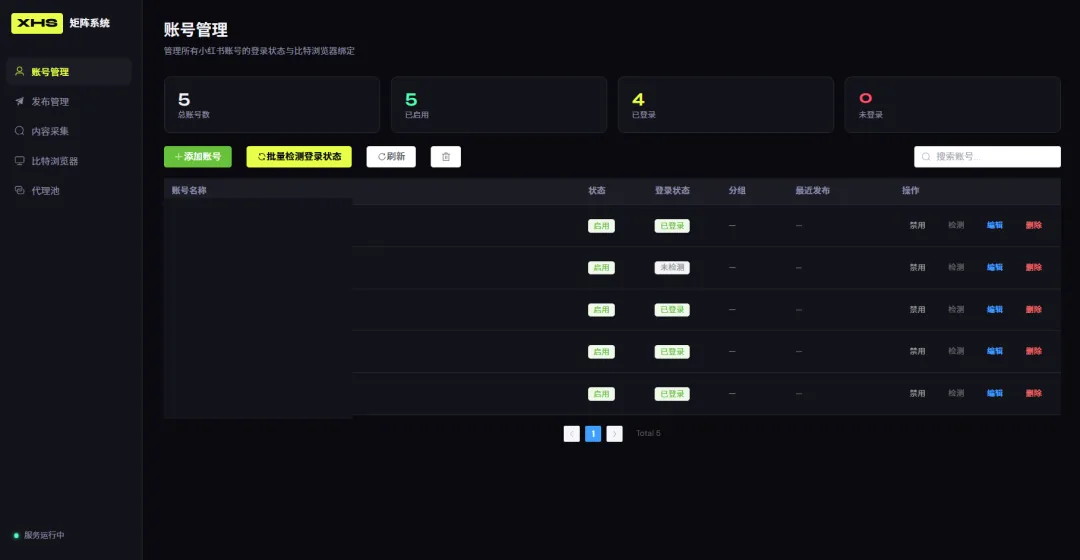
WebUI admin dashboard: 5 pages — account management, publishing management, content collection, browser management, proxy pool management. Dark theme, built with Vue 3 + Element Plus.
Multi-account management: supports multiple Xiaohongshu accounts, each with its own independent browser fingerprint and proxy IP. Adding an account works like this: the system automatically opens a browser window with a unique fingerprint, you scan the QR code to log in, and the login session is saved automatically. It also has batch login-status checks and a soft-delete recycle bin (mistakenly deleted items can be recovered within 3 days).
Content collection: enter a keyword, and the system automatically scrapes Xiaohongshu post data (title, body text, images, engagement data), writing it all into Lark Base (Feishu's Airtable-style database). A colleague just types "@小张 collect AI programming" in the Feishu (Lark) group chat, and the system automatically starts working.
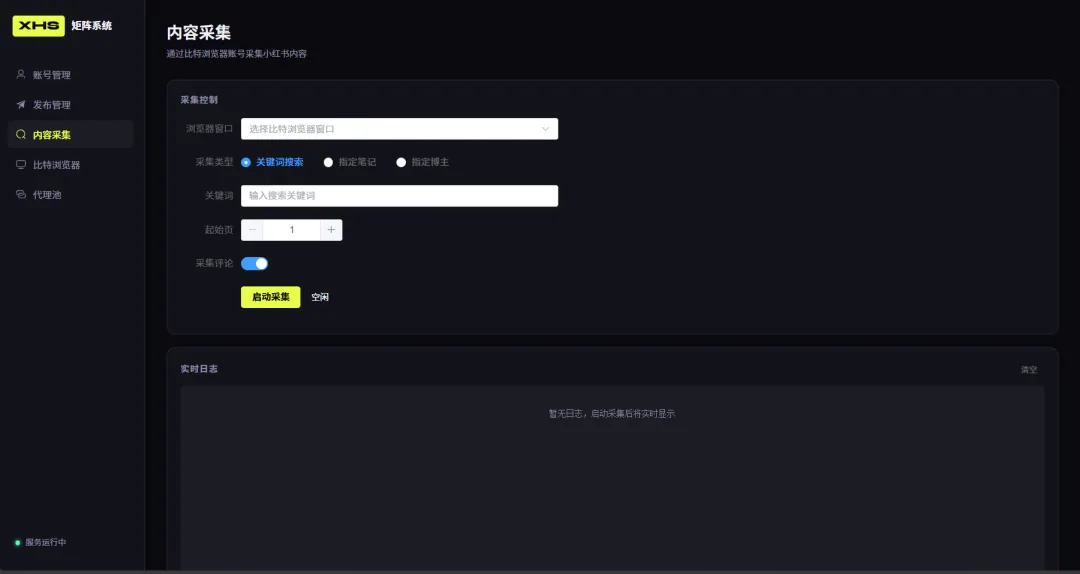
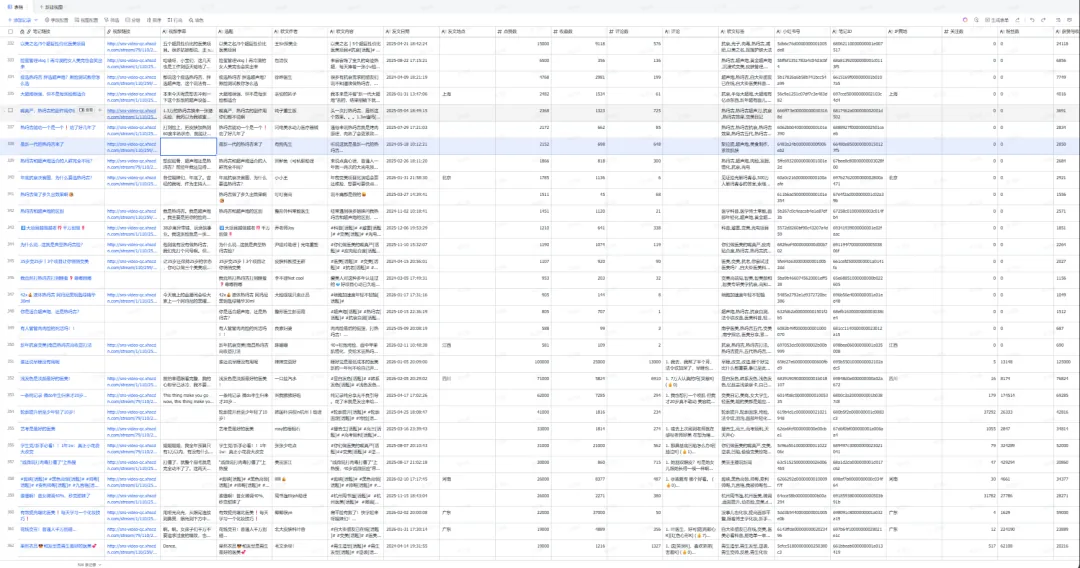
Content management: Lark Base is our content hub. Posts that get collected are filtered, rewritten, and scheduled right there. Which ones are worth publishing, which account to publish to, when to publish it — it's all done inside Feishu, no separate backend needed.
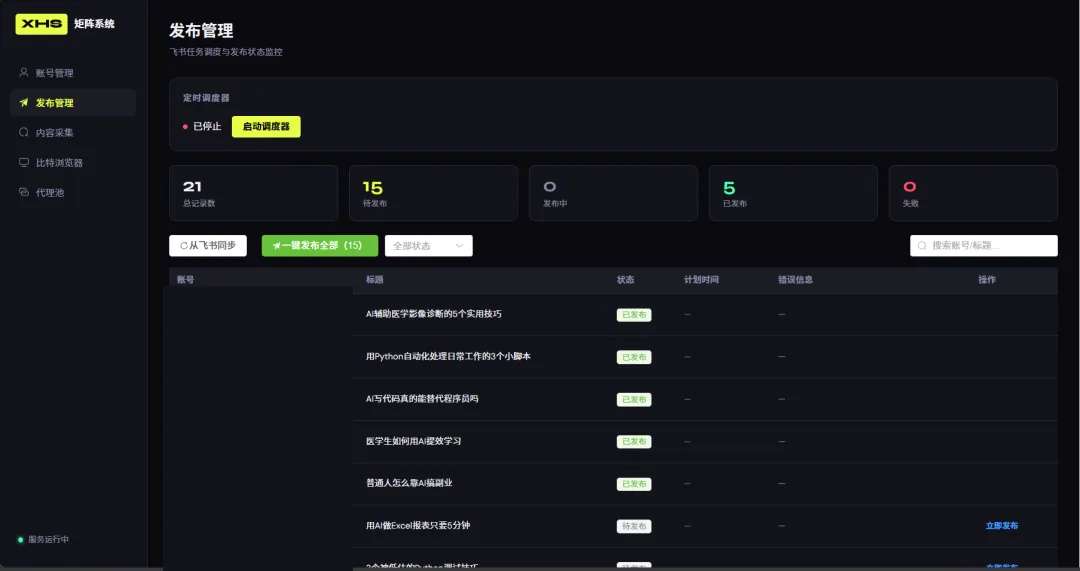
Automated publishing: this is the core of the whole system. You fill in the title, body text, and upload images in the Feishu publishing sheet, change the status to "pending publish," and the system will automatically:
- Download the images from Feishu
- Open the browser window for the corresponding account
- Navigate to the Xiaohongshu creator platform
- Upload images, fill in the title, fill in the body text
- Click publish
- Check whether publishing succeeded
- Write the result back to Feishu (success/failure, published link, error message)
Publishes to the same account are spaced out with a random delay of 3–8 minutes; different accounts can publish in parallel. After publishing, the browser closes automatically and temp files get cleaned up.
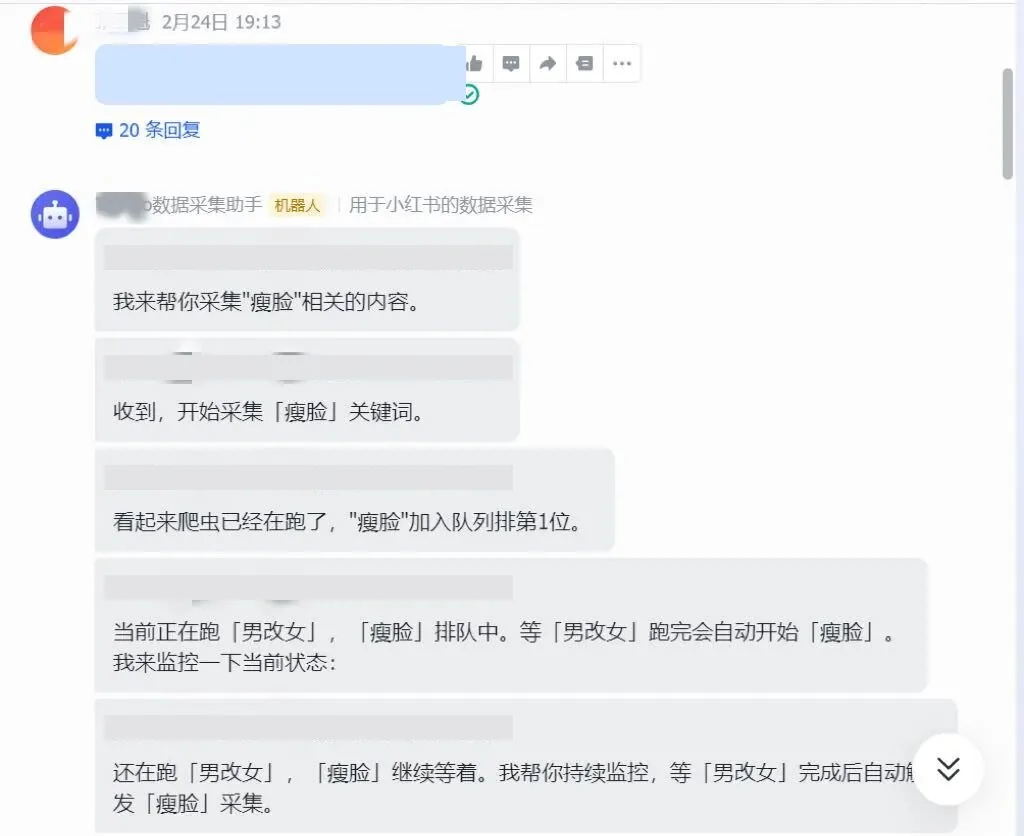
Feishu bot integration: OpenClaw runs on my laptop and is connected to a Feishu bot. A colleague types "@小张 collect xxx" in the group chat, the system queues it up automatically, and posts the result in the group when it's done. No need to log into any dashboard — the Feishu group chat is the entry point.
Technical architecture: one diagram to explain it all
Keyword input (Feishu group chat, @小张)
    ↓
Content collection (crawler module)
    ↓
Lark Base (content table)
    ↓ manual/AI filtering and rewriting
Lark Base (publishing table)
    ↓
Auto-publish engine (takes over browser via CDP)
    ↓
Xiaohongshu (multi-account matrix publishing)
    ↓
Results written back to Feishu
Tech stack: Python + FastAPI + Playwright + browser CDP protocol + Feishu Open Platform API + Vue 3 + Element Plus + SQLite.
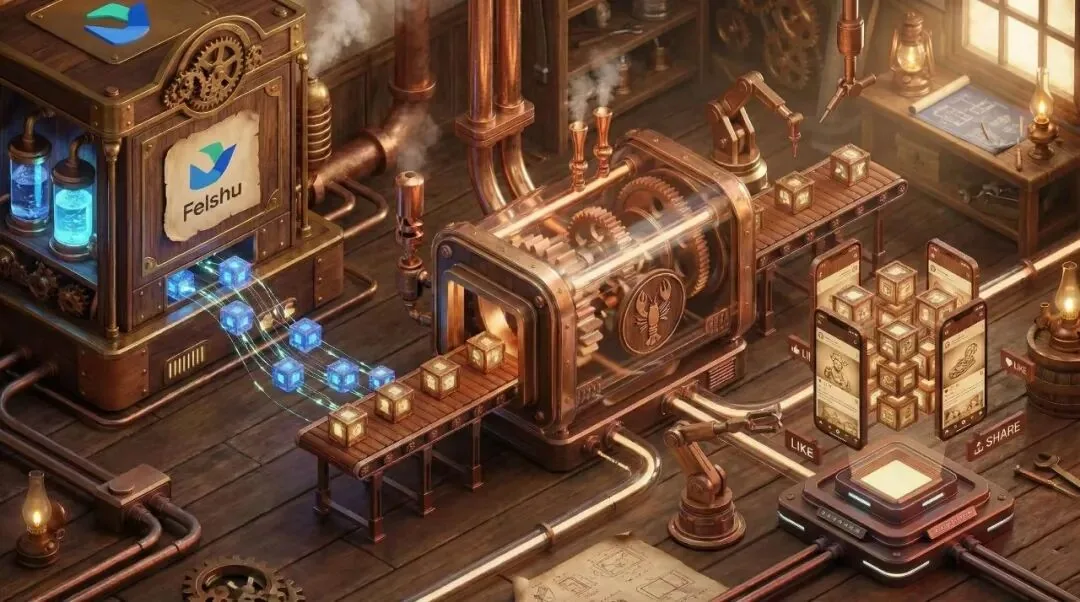
It all runs on a single Windows laptop. No server, no Docker, no microservices. One FastAPI process handles both backend and frontend static files — start it on port 8080 and it's ready to use.
Why these choices? Because they're good enough.
Lark Base is naturally a database with built-in permissions, collaboration, and attachments — no need to build a content admin backend from the ground up. The browser CDP protocol can take over an already-open browser window directly, no need to simulate logins or crack CAPTCHAs. SQLite is a single-file database — no need to install MySQL, and backing up is just copying one file.
The core idea behind this architecture is: don't build it yourself if something off-the-shelf already works, and don't overcomplicate what can stay simple.
How I didn't write a single line of code
Let me be clear about what "didn't write code" means: I never manually typed a single line of Python, JavaScript, Vue, or SQL. All the code was generated by AI.
But that doesn't mean I did nothing.
What I was responsible for
Defining requirements: what the system should do, what it shouldn't, and how to prioritize. For example, "get collection→Feishu working first, then publishing, then the frontend" — that order was my call.
Logic design: how data flows, how accounts are managed, how failed publishes get retried, how concurrency is controlled. These are the business-logic decisions I thought through and then explained to the AI. The AI won't figure this out for you.
Technical decisions: SQLite or a JSON file? Playwright or Selenium? Hard delete or soft delete? These calls were mine. The AI would give suggestions, but the final decision was mine to make.
Testing and verification: after any feature was built, I'd actually run it. The publishing feature was verified by actually publishing a real post to Xiaohongshu — not by reading the code and thinking "should be fine."
Handling pitfalls: when something broke, I was responsible for describing the symptoms, providing the error messages, and judging whether the AI's proposed fix actually made sense. Sometimes the AI's fix would introduce a new problem, and I had to be able to catch that.
What AI (OpenClaw) was responsible for
Writing code: all the Python backend, Vue frontend, API routes, database operations, Feishu API calls — all written by AI.
Debugging: when there was an error, I'd hand the error message over, and it would analyze the cause and propose a fix.
Refactoring: for example, when migrating the publishing task storage from JSON files to SQLite, all I said was "concurrent writes to JSON risk losing data, switch to SQLite," and the AI rewrote the entire storage layer, including an automatic data migration.
Documentation: project docs, progress logs, quick-start guides — all written by AI.
How we collaborated
My collaboration pattern with OpenClaw basically went like this:
- I describe what needs to be done (in natural language, no pseudocode needed)
- AI proposes an approach, I confirm or adjust it
- AI writes the code, I run it to see the result
- If there's a problem, I give feedback, AI fixes it
- If it's fine, we move on to the next feature
A typical exchange went like this:
Me: "The success-detection logic for publishing is wrong right now — it shows success even when it clearly didn't publish."
AI: "Right now it's detecting the 'published successfully' text on the page, but Xiaohongshu may have changed that text. I'd suggest switching to detecting the URL redirect instead — after a successful publish, the URL changes from /publish to /noteDetail."
Me: "Yeah, change it."
That's it. I didn't need to know how Playwright's API works — I just needed to know the business fact that "the URL changes after a successful publish."
The build process: what I did in a week
Day 1–2: the collection module
Built on top of the open-source MediaCrawler with some modifications — mainly to the data storage. The original version saved to local files; I changed it to write directly to Lark Base. That way, collected data lands straight in Feishu — no importing or exporting needed.
Hit one snag: on Windows, Playwright's event loop conflicted with FastAPI's uvicorn, and it would error out on startup. The AI fixed it by adding one line configuring the event loop policy. Honestly, this kind of platform-compatibility issue would probably have taken me half a day to figure out on my own.
Day 3–4: the publishing module (the hardest part)
The publishing module is the most technically demanding part of the whole system. The core flow takes over the browser via the CDP protocol, then uses Playwright to simulate manual actions.
A few key pitfalls:
Image upload: the file input behind Xiaohongshu's upload button is hidden, and the standard "wait for the element to become visible, then interact" approach simply couldn't find it. The AI tried several approaches, and eventually switched to a different way of locating the element, which finally found this hidden element reliably.
Publish detection: how do you tell if a publish succeeded? At first it detected the "published successfully" text on the page, but that wasn't reliable. Later it switched to mainly detecting the URL redirect — after a successful publish, the page redirects to the post detail page, and the URL changes. Adding 500ms polling with a 30-second timeout made this much more reliable.
Retry logic: not every failure is worth retrying. If an account gets banned, retrying a hundred times won't help, but a network timeout might resolve on a single retry. The AI helped classify errors — configuration errors (account issues, permission issues) are marked as non-retryable and skipped immediately; network errors are marked as retryable.
Day 5: account management
Account management went through a full redesign.
The original plan was to open Chrome with Playwright, capture the login QR code, and display it on the frontend. Then Xiaohongshu's login page got redesigned, and the CSS selectors for the QR code all broke.
I dropped that plan and switched to something much simpler: call the fingerprint browser's API directly to create a window with its own fingerprint and proxy, navigate to the Xiaohongshu login page, and have the user scan the QR code in the browser window that pops up themselves. The login session is saved directly inside the fingerprint browser — no need to export cookies.
This approach was much simpler than the original, and more stable too. Sometimes the best technical solution isn't fixing the old one — it's switching to a different approach entirely.
Data storage also got migrated from JSON files to SQLite. The reason was practical: every write to a JSON file overwrites the whole thing, so multiple simultaneous requests writing at once would lose data. SQLite's WAL mode naturally supports concurrent reads and writes.
Day 6: the frontend WebUI
Vue 3 + Element Plus + Vite, dark theme. 5 pages: account management, publishing management, content collection, browser management, proxy pool management.
I had the AI generate the frontend in one go, then went page by page hooking up the APIs and fixing bugs. The frontend was the fastest part to build, because the Element Plus component library is very mature and the AI knows it extremely well.
One small detail: the publishing management page had no pagination at first, and once there was a lot of data, the page got really sluggish. Added pagination, 10 items per page, problem solved. This kind of "you only find out what's missing once you actually use it" requirement is just daily life with Vibe Coding.
Day 7: integration and wrap-up
Connected OpenClaw's Feishu bot and configured the collection queue. Tested the full flow in the Feishu group chat: @小张 collect keyword → automatic collection → written to Feishu → manual filtering → filled into the publishing table → automatic publish → results written back.
The entire pipeline worked end to end.
Also did some wrap-up work: migrated publishing tasks from JSON to SQLite, filled out .gitignore, updated progress docs, and wrote a quick-start guide for the project.
Zero code doesn't mean zero barrier to entry
When I say "didn't write a single line of code," I don't mean this was easy.
The barrier to entry for Vibe Coding isn't coding ability — it's these things:
Logical thinking: you need to be able to break a vague requirement down into clear steps. "I want a Xiaohongshu matrix system" — the AI can't act on that sentence. "I want a system that reads pending-publish records from a Feishu sheet, downloads the attached images, opens a browser via CDP, navigates to the publish page, uploads the images, fills in the title and body text, clicks publish, checks the result, and writes the status back" — the AI can act on that.
Judgment: the AI's proposed solution isn't always right. It might over-engineer things, use an unsuitable technology, or fix one bug while introducing two more. You need to be able to judge that. This ability doesn't come from programming experience — it comes from understanding the problem itself.
Patience and resilience: a week sounds fast, but in between there was a huge amount of "run it → error → give feedback → fix → run it again → error again" looping. Vibe Coding isn't a one-sentence request that produces a finished product — it's ongoing dialogue and iteration.
I wrote an earlier post summarizing my AI coding experience, and one line from it was: logic first, code second. This project proved that point perfectly. The differential-diagnosis thinking my medical training taught me — piecing through a pile of symptoms to find the root cause — turned directly into the ability to locate the root cause among a pile of error messages here.
Another line: refactor when you need to, don't just patch. The redesign of account management is a good example. When the QR code capture approach broke, I didn't have the AI adapt to the new selectors — I switched to a better approach entirely. Sometimes starting over is faster than patching things up.
Current status
Done:
- Full pipeline from collection → Feishu → publishing
- Multi-account management (independent fingerprints + proxies + soft-delete recycle bin)
- 5-page WebUI
- Feishu bot-triggered collection
- Publish retry logic (retryable/non-retryable error classification)
- Data storage migrated to SQLite
Next up:
- Feishu failure alerts (automatic notification on publish failure)
- AI content rewriting (collected content auto-rewritten before entering the publishing table)
- Data dashboard (publish success rate, per-account stats)
Final thoughts
In my last post I said: "Not knowing how to code isn't a barrier."
This time I proved that in a week. A complete Xiaohongshu matrix management system — collection, management, publishing, monitoring — built entirely by directing OpenClaw + Vibe Coding, without writing a single line of code myself.
This isn't a toy demo — it's a system genuinely running a real business. A colleague can use it by just typing @ in the Feishu group chat, and the posts it publishes really do show up on Xiaohongshu.
The core of Vibe Coding isn't "having AI write code" — it's "letting people who can't code turn ideas into real products." What you need isn't programming ability — it's clear logic, sound judgment, and enough patience.
If you're also using OpenClaw, or interested in Vibe Coding, I'd love to talk.
I'm Ktao, someone who does AI with a medical student's mindset. Last time I built a memory system; this time I built a Xiaohongshu matrix system. What's next, I haven't figured out yet.
This post was first published on the WeChat Official Account; please credit the source if you republish it.
Comments
Loading…